Turn on suggestions
Auto-suggest helps you quickly narrow down your search results by suggesting possible matches as you type.
Showing results for
Get 50% OFF QuickBooks for 3 months*
Buy nowSolved! Go to Solution.
Let me provide details about this, Vis.
Each payment processor or platform is responsible for sending you a Form 1099-K if you did more than $600 in business transactions regardless of the number of transactions.
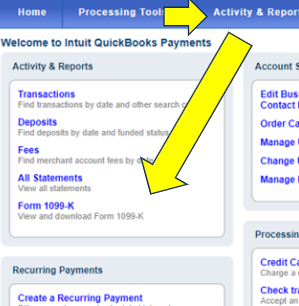
Just so you know, you can download the form from the Merchant Service Center. To do so, follow the steps below:
The IRS is delaying the 1099-K threshold change for third-party settlement organizations (TPSO). Taxpayers and small businesses will not receive a 1099-K from TPSOs for tax year 2023 (taxes you’ll file in 2024) unless the gross amount of reportable payments exceeds $20,000 and the number of such transactions exceeds 200. The IRS now plans to use the 2024 tax year (taxes you’ll file in 2025) as a transition year with a threshold of $5,000.
To give you more details about this, check out these articles for reference:
Moreover, you may also want to know how to fix and resubmit rejected 1099-NEC and MISC forms. Go over this article for more details: Fix Rejected 1099 Forms.
Keep in touch if you need further assistance with the 1099-K. The Community is always right here to help you all the time.
Let me provide details about this, Vis.
Each payment processor or platform is responsible for sending you a Form 1099-K if you did more than $600 in business transactions regardless of the number of transactions.
Just so you know, you can download the form from the Merchant Service Center. To do so, follow the steps below:
The IRS is delaying the 1099-K threshold change for third-party settlement organizations (TPSO). Taxpayers and small businesses will not receive a 1099-K from TPSOs for tax year 2023 (taxes you’ll file in 2024) unless the gross amount of reportable payments exceeds $20,000 and the number of such transactions exceeds 200. The IRS now plans to use the 2024 tax year (taxes you’ll file in 2025) as a transition year with a threshold of $5,000.
To give you more details about this, check out these articles for reference:
Moreover, you may also want to know how to fix and resubmit rejected 1099-NEC and MISC forms. Go over this article for more details: Fix Rejected 1099 Forms.
Keep in touch if you need further assistance with the 1099-K. The Community is always right here to help you all the time.


You have clicked a link to a site outside of the QuickBooks or ProFile Communities. By clicking "Continue", you will leave the community and be taken to that site instead.
For more information visit our Security Center or to report suspicious websites you can contact us here


