Turn on suggestions
Auto-suggest helps you quickly narrow down your search results by suggesting possible matches as you type.
Showing results for
Get 50% OFF QuickBooks for 3 months*
Buy nowDuring Vendor Bill or Expense entry, the Item's purchase description will sometimes display in the dropdown list.
Sometimes it does not. We can't find any setting to ensure that the Item's purchase description always displays, but hopefully we're just missing something. Does anyone know how we can make sure this always displays? (screenshot attached) It greatly improves the ease of our Item selection process, as we can start typing the description to filter the list.
Thank you for getting in touch with us, Heather.
I'll gladly share the information you need to help you achieve your goal.
You'll want to go to your Products and services and check if you've input the item description in the correct information box. Also, ensure you put the check mark to the checkbox for the product detail to display in the dropdown list during your Bill or Expense entry.
Here's how:
1. Go to the Sales tab, then Products and services.
2. Hover over a specific product or service and click Edit.
3. Make sure to put a check on the checkbox under Description.
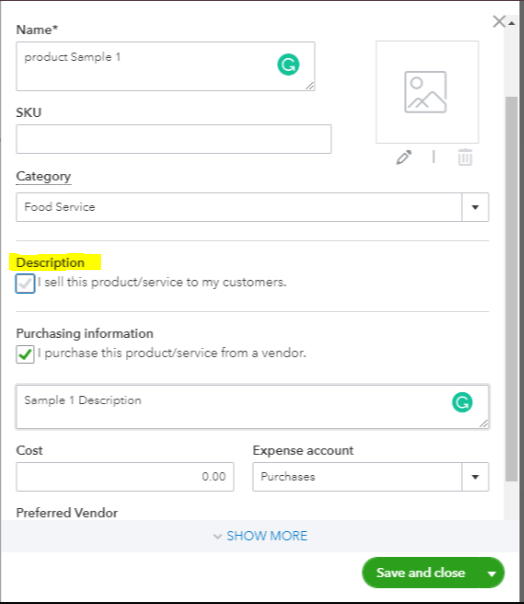
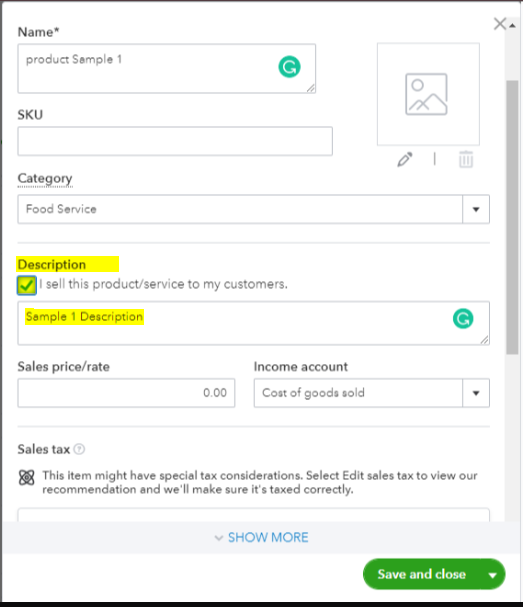
4. Type your item details.
5. Save and close.
Once done, you can check it by recording a bill and see if the item detail displays.
However, if the issue persists, in the meantime, you can perform basic troubleshooting steps to determine if it is a browser-related issue. You can use a private browser. If this fixes it, we can proceed and clear the cache in the one that you're currently using. Here’s how to use a private browser:
You can refer to this article if the steps were successful: Clear cache and cookies to fix issues when using QuickBooks Online.
You can visit this article to learn how to personalize and add specific info to your sales forms: Customize invoices, estimates, and sales receipts in QuickBooks Online.
Know that the Community is always here to back you up. Have a great day ahead!
Hi James! Thank you very much for your response.
May I ask for clarification on this statement? "Also, ensure you put the check mark to the checkbox for the product detail to display in the dropdown list during your Bill or Expense entry." Is there another checkbox somewhere that I should look for aside from the "I sell this product/service to my customers." and "I purchase this product/service from a vendor." checkboxes shown in the screenshots you provided?
It's good to see you back, @Heather-M. I'm here to provide clarification about your query.
The only checkbox my colleague @JamesAndrewM is referring to is the one highlighted on the screenshot he provided.
I've included the following article as supplemental reading for your convenience, so you can learn more about managing your bills and expenses:
Feel free to visit the Community should you have other concerns. I'll be around to help. Have a great day ahead.


You have clicked a link to a site outside of the QuickBooks or ProFile Communities. By clicking "Continue", you will leave the community and be taken to that site instead.
For more information visit our Security Center or to report suspicious websites you can contact us here


