Hey there, Dan.
Thanks for coming to the Community. I'm here to provide information about the limitations when moving from QuickBooks Online (QBO) to QuickBooks Desktop (QBDT).
When you transfer your data, billable/reimbursable status on deposits doesn't copy. It also includes the following:
- Recurring transactions and unaccepted online banking transactions
- Transaction attachments (invoices, expenses, and checks, etc)
- Location information, custom field data, markups, and To Be Sent status
- Voided transfers, received payments, and bill payments made by check or credit card
You may also refer to this article for more info: Learn How Features and Data Move From QBO to QBDT.
I recognize the importance of being able to export all your transactions. I encourage you to add your vote for this one by sending a request within QuickBooks. They're always looking to the opinions of users like yourself when determining how best to improve QuickBooks.
Here's how:
- Go to the Help menu.
- Choose Send Feedback Online and select Product Suggestion.
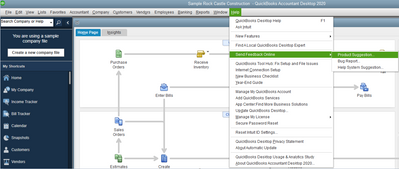
- Click the Product Area drop-down menu and select a category.
- Enter your comments or product suggestions.
- Select Send Feedback.
Please let me know if you have other concerns or how else I can empower you to make QuickBooks work the way your business needs. Wishing you even more success ahead.


