Turn on suggestions
Auto-suggest helps you quickly narrow down your search results by suggesting possible matches as you type.
Showing results for
Get 50% OFF QuickBooks for 3 months*
Buy nowMy boss is wanting to put $1500.00 into each employees 401K. My question is how do I need to do this as far as QuickBooks. Couldn't we right one check and have the company that handles our 401K accounts distribute the amounts to the correct accounts. Someone said something about having to write a check for each employee and not take out Federal and state taxes (my concern is that will make the employees income increase and they would be responsible for the state and federal taxes on that amount). Any advise or pointing in the direction of where to look for this situation on IRS page would be greatly appreciated.
Thank you

Thank you for reaching out with your question about managing 401K contributions. It's great to see your commitment to your employee's financial well-being, @Kristiehamm22.
Creating one check for all employees' 401K and distributing it to each employee's account is unavailable in the program. Yes, you can write a check for each employee but the Federal and State taxes aren't taken out which increases the employee's income, but being responsible for their Federal and State taxes is not possible because their taxes must be reported on Form W-2.
However, you can set up a retirement plan for 401K for each employee in QBO so it'll be reported on your payroll tax forms. When you run a payroll for each employee it will automatically calculate/add contributions and deductions.
You can follow the steps below on how to set up a 401K retirement plan for each employee.
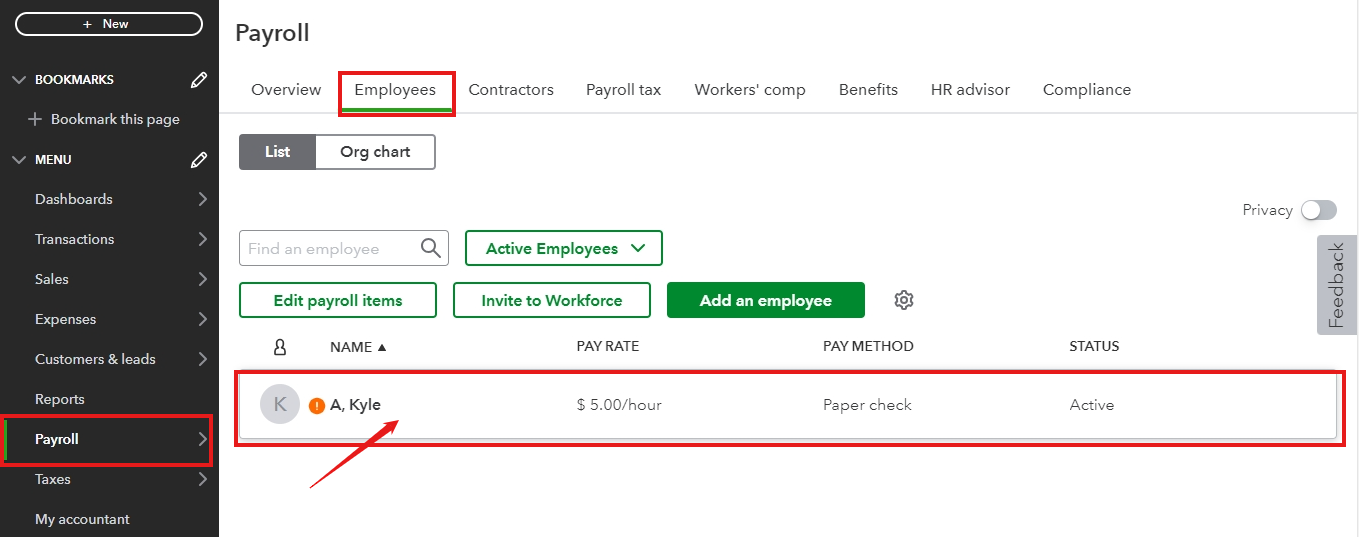

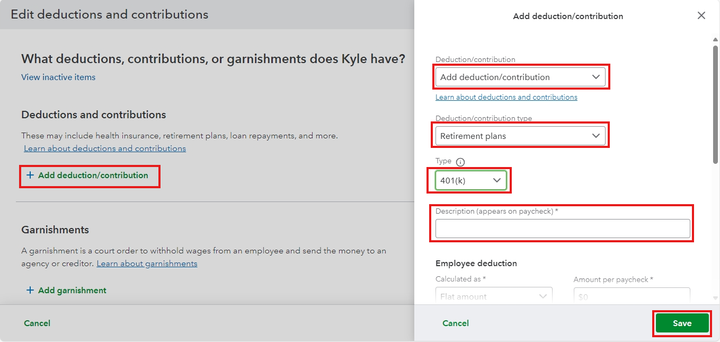
Please repeat the steps for the other employees for their 401K.
If you want to write a check for each employee, please consult your accountant for advice.
In addition, I'll add helpful articles on handling your deductions and contributions using QuickBooks Online Payroll. These resources will help you set up your retirement plan deductions.
Lastly, you may also run payroll reports or create a payroll summary report in QuickBooks. These articles can help you customize your payroll reports and see what you've paid and your payroll totals.
Please reply here for more clarification on handling 401K contributions in QuickBooks Online, so we can assist you further. We're here to ensure everything runs smoothly for you and your team. Have a great day!
"Someone said something about having to write a check for each employee and not take out Federal and state taxes (my concern is that will make the employees income increase and they would be responsible for the state and federal taxes on that amount)."
I don't plan to weigh in on the main point of your post, but I'll clear this part up.
With traditional 401(k)s, a couple things happen with the employee-side contributions (the amount that comes out of their paychecks).
First, the social security and medicare taxes are calculated before the 401(k) employee-side contribution comes into play. So, the employee is still paying social security and medicare wages on their full gross wages before the 401(k) deduction.
Second, 401(k) employee-side contributions lower their gross wages for income tax purposes; that is, the amount that would normally show up in Box 1 of a W-2. So, federal and state income tax withholdings are calculated on the remaining gross pay after the 401(k) employee-side contribution is deducted from the gross pay, as contrasted with the social security and medicare tax calculations noted above.
This is because traditional 401(k)s are a way to defer income; federal and state income taxes are paid on the income tax return associated with the year when they withdraw the money from their 401(k) later in life, not on their original paychecks or the income tax returns associated with said original paychecks.
In short, it will not increase the employees' gross income; quite the opposite, in the context of the tax year of the paychecks you are working with.
Of course, this is the case for traditional 401(k)s; Roth, for instance, works differently. If you're not sure how this all works, it's best to consult a tax professional. The staff here aren't trained for this kind of question.
@CharmieH "Creating one check for all employees' 401K and distributing it to each employee's account is unavailable in the program. Yes, you can write a check for each employee but the Federal and State taxes aren't taken out which increases the employee's income, but being responsible for their Federal and State taxes is not possible because their taxes must be reported on Form W-2."
Whoever is in charge of editing these posts after the fact, please do so; this entire section reads like a rearranged (and entirely invalid) copypasta of the OP's post. It may as well be cut entirely.
@Kristiehamm22 "So, the employee is still paying social security and medicare wages on their full gross wages before the 401(k) deduction."
Correcting this; should read taxes instead of wages.
Blame the fireworks going off all last night, and Intuit not allowing me to edit my own posts.


You have clicked a link to a site outside of the QuickBooks or ProFile Communities. By clicking "Continue", you will leave the community and be taken to that site instead.
For more information visit our Security Center or to report suspicious websites you can contact us here


