Turn on suggestions
Auto-suggest helps you quickly narrow down your search results by suggesting possible matches as you type.
Showing results for
Get 50% OFF QuickBooks for 3 months*
Buy nowI've got you covered, @rhuitsing. To ensure a smooth import of your journal entries (JE) into QuickBooks Online (QBO), let's turn off the account numbers feature in the Account and settings.
Here's how:
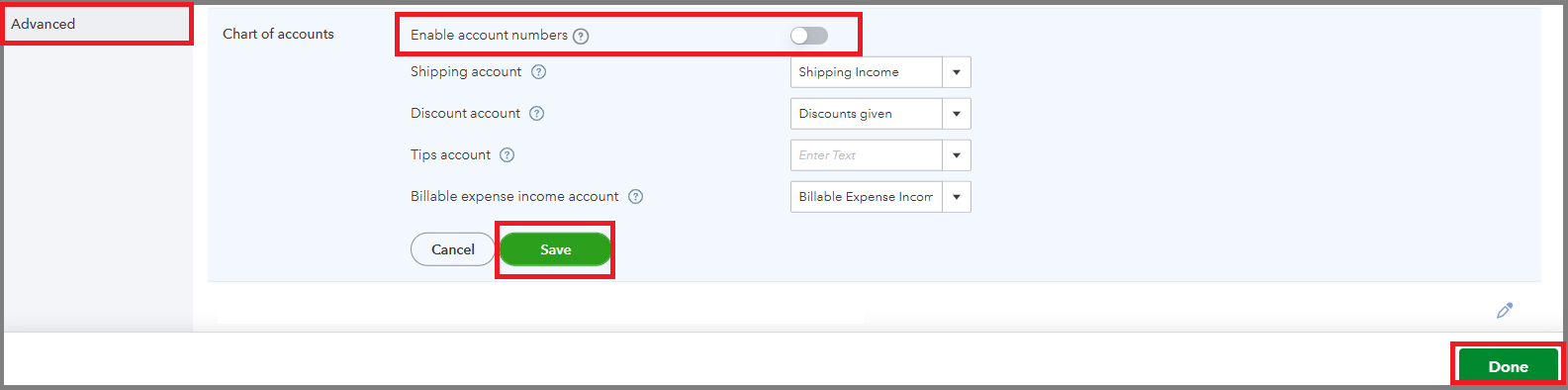
After that, proceed to import your JEs. If needed, you can also enable class and location tracking to include those during the import process.
Once you’re done, we can use the search function to review and edit the JEs as necessary.
To further enhance your QuickBooks experience, our QuickBooks Live Expert Assisted team can guide you on best practices for handling JE transactions.
This thread will remain open if you have other queries. I'm always here to help.
The account number is not the problem. It is the classification/type. We call them transfer accounts. QB does not have transfer as an account type. What do I do about the type?
You'll need to set up a transfer account in your Chart of Accounts for a successful import process of your journal entries, rhuitsing.
If you have a transfer account in BlackBaud, you'll need to create a corresponding transfer account in the Chart of accounts within QuickBooks Online (QBO). This will ensure a smooth and successful import of your journal entries.
Here's how:


Once you're done setting up a transfer account in your Chart of accounts, you can proceed with importing your journal entries.
If you need to update or correct a journal entry, or if it was created by mistake, you have the option to either reverse or delete it in QuickBooks Online.
Please know that we're open 24/7 in case you need more help from us.
Thank you for your suggestion. Step 4 is where I hit a roadblock. QBO does not have "Transfer" as an account Type to set it up like BlackBaud. Can we create Account Types?
Thank you for your suggestion. Step 4 is where I hit the roadblock. QBO does not have "Transfer" as an Account Type. Can we create Account Types?
Thank you for following the steps shared by my colleague, Rhuitsing.
When selecting an account type, it’s important to verify how Blackbaud categorizes transfers. If Blackbaud treats transfers as an expense account for closing fund balances at year-end. You can utilize existing expense accounts or create a new one in the Chart of Accounts.
To ensure your setup aligns with financial best practices, I recommend consulting with your accountant for guidance. If you don't currently have an accountant, you can find one in your area by searching here: Find a ProAdvisor.
I'll be around if you need further assistance with setting up accounts or any QBO-related task.


You have clicked a link to a site outside of the QuickBooks or ProFile Communities. By clicking "Continue", you will leave the community and be taken to that site instead.
For more information visit our Security Center or to report suspicious websites you can contact us here


