Get 50% OFF QuickBooks for 3 months*

Buy now
cancel
Showing results for 
Search instead for 
Did you mean: 
Announcements
Simplify payday and set payroll to run automatically on QuickBooks. Explore QuickBooks Payroll
kara20
Level 1

Can I turn off auto recall feature in QBSE on invoices? It auto-populates a thing I put in the description field two years ago and that only applied to that one invoice.

I don't want anything to auto-populate as the projects I work on are all different and the description is where I put one-time specific info.

1 Comment 1
JeraldR
QuickBooks Team

Can I turn off auto recall feature in QBSE on invoices? It auto-populates a thing I put in the description field two years ago and that only applied to that one invoice.

We're unable to turn off the auto recall feature that automatically populates details in the description field, @kara20.
 

However, you can edit it and put in new descriptions. Here's how:
 

  1. Open or create a new invoice.
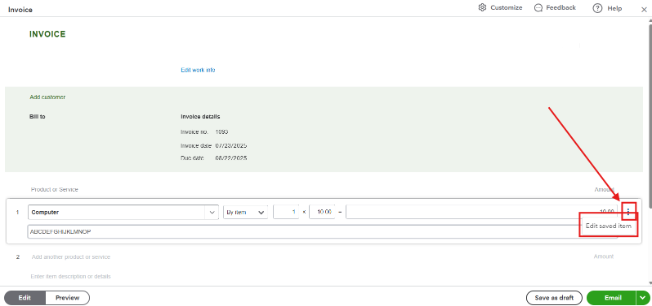
  2. Choose the item under Product or Service.
  3. Click the Three-dot icon in the upper-right-hand corner.
  4. Select Edit Save Item.
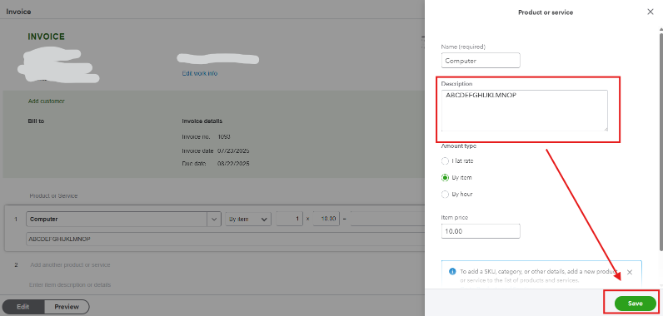
  5. Type in new description, then hit Save.
     

If you have any other questions about QuickBooks, let us know in the comments below. 

Need QuickBooks guidance?
Log in to access expert advice and community support instantly.

Need to get in touch?

Contact us