Turn on suggestions
Auto-suggest helps you quickly narrow down your search results by suggesting possible matches as you type.
Showing results for
I have a liability account for prepaid membership dues. This has subaccounts like this:
Prepaid Membership Dues:2026:Individual
Prepaid Membership Dues: 2026: Family
Prepaid Membership Dues:2027: Individual
Etc. When I try to select the account in a Jornal Entry, I see a bunch of subaccounts such as "Individual", but the full path (including the year) is not shown in the dropdown. The full path DOES show up once I select the account, but I end up guessing at which one it is in the dropdown and have to try several times to get the correct one. Online help says to clear the cache. That does not resolve the issue.
Can the dropdown be made to show the full subaccount path?
Thanks!

It's a great idea to show the full subaccount path whenever you select an account when creating a journal entry, @Harold85711.
Currently, displaying the subaccount when making a journal entry is limited to a certain number and box size. Take note that the shorter the name of the account, the better it is to show the year.
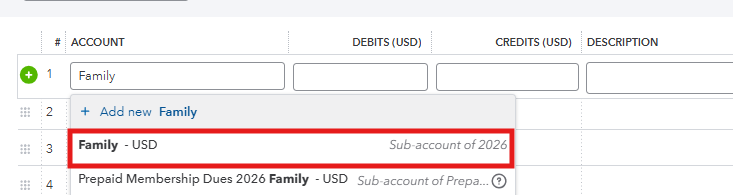
I also recommend using the year and specific names to locate your sub-account. In the meantime, you can submit direct feedback to our Product Development Team and raise this feature suggestion in the Account section when creating a journal entry.
Once they see the benefits of it to our users, they can add it to our future product updates.
Keep us updated if you have additional suggestions or questions about creating journal entries by replying to this post.
Thanks! I had thought that maybe the account column on the general journal entry was not wide enough, so I dragged the right side to the right making the column wider, but only the last level of subaccount still showed up. I COULD flatten the structure by repeating data in the subaccount names (like having an account named "2026 individual prepaid dues" and another "2026 family prepaid dues", etc., but that seems to defeat the whole organizational purpose of subaccounts. It would also make the balance sheet very repetitive instead of taking advantage of the subaccount feature. As I recall, QB Desktop did not have this issue.
I'll keep doing the hunt and peck to find the right account while I wait for an update. By the way, I see there was a major update in the past couple days. I'm still finding where everything moved to.
Thanks!
Harold
I'll wait for a fix from the developers. Also, the direct feedback link did not work. The instructions say:
Settings ->Feedback results in no action (the settings menu remains visible).


You have clicked a link to a site outside of the QuickBooks or ProFile Communities. By clicking "Continue", you will leave the community and be taken to that site instead.
For more information visit our Security Center or to report suspicious websites you can contact us here


