Turn on suggestions
Auto-suggest helps you quickly narrow down your search results by suggesting possible matches as you type.
Showing results for
SALE EXTENDED 70% OFF QuickBooks for 3 months* Ends 12/8
Buy nowSolved! Go to Solution.
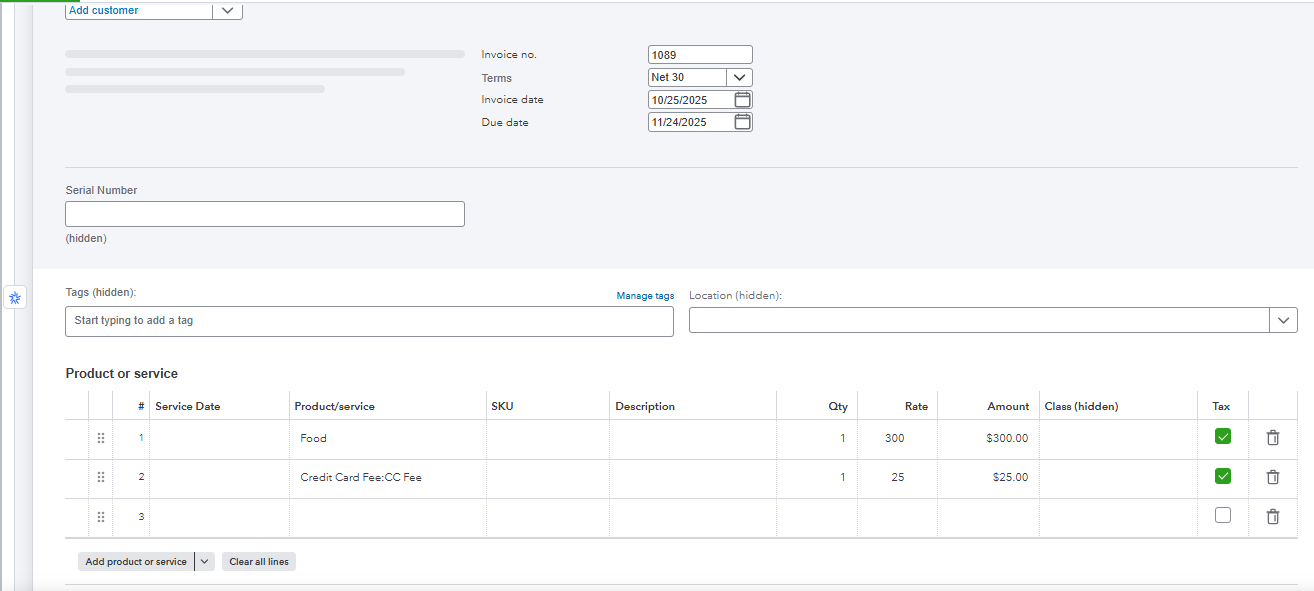
You can apply credit card processing fees to the customers' invoice by manually adding a service item, Shannon.
First, we'll have to create a service item. Here's how:
Once done, open your invoice and add the created service item as an additional line on your invoice. Take a look at my screenshot.
For customers paying via ACH bank transfer, you have the option to let them pay the convenience fee automatically.
If you have more questions, feel free to reply below.
You can apply credit card processing fees to the customers' invoice by manually adding a service item, Shannon.
First, we'll have to create a service item. Here's how:
Once done, open your invoice and add the created service item as an additional line on your invoice. Take a look at my screenshot.
For customers paying via ACH bank transfer, you have the option to let them pay the convenience fee automatically.
If you have more questions, feel free to reply below.


You have clicked a link to a site outside of the QuickBooks or ProFile Communities. By clicking "Continue", you will leave the community and be taken to that site instead.
For more information visit our Security Center or to report suspicious websites you can contact us here


