Depending on the account you're trying to merge, it can be done through the Chart of accounts page, and by selecting the specified account, Naomi. We'll provide more details below to ensure your inquiry is addressed accurately.
Before we proceed, please note that merging accounts is permanent and cannot be undone once completed. Additionally, some accounts created by the program, especially those connected to online banking, are not recommended for merging.
When you're ready, ensure that your credit card account isn't connected to QuickBooks. Otherwise, you won't be able to merge the account you have in your COA. After disconnecting the account, these are the steps to help you merge accounts:
- On the top-right corner, click the Gear icon and select Chart of accounts.
- Find the account you want to keep. Then, select the dropdown ▼ in the Action column and then Edit.
- Note the Account Name, Account Type, and Detail Type of the account. These must be the same between the accounts you want to merge.
- Check if the account is a subaccount or a parent account. The names of subaccounts are indented in the Name column of the Chart of accounts list. If it is, note the parent account it's tied to.
- Return to the Chart of accounts.
- Find the duplicate account (the one you won't keep). Then, select the dropdown ▼ in the Action column and then Edit.
- Change the Account name and Detail Type to that of the account you want to keep.
- When you're ready, select Save and then Yes, merge accounts. QuickBooks moves past transactions from the duplicate to the account you want to keep.
For visual reference, please see the image below.
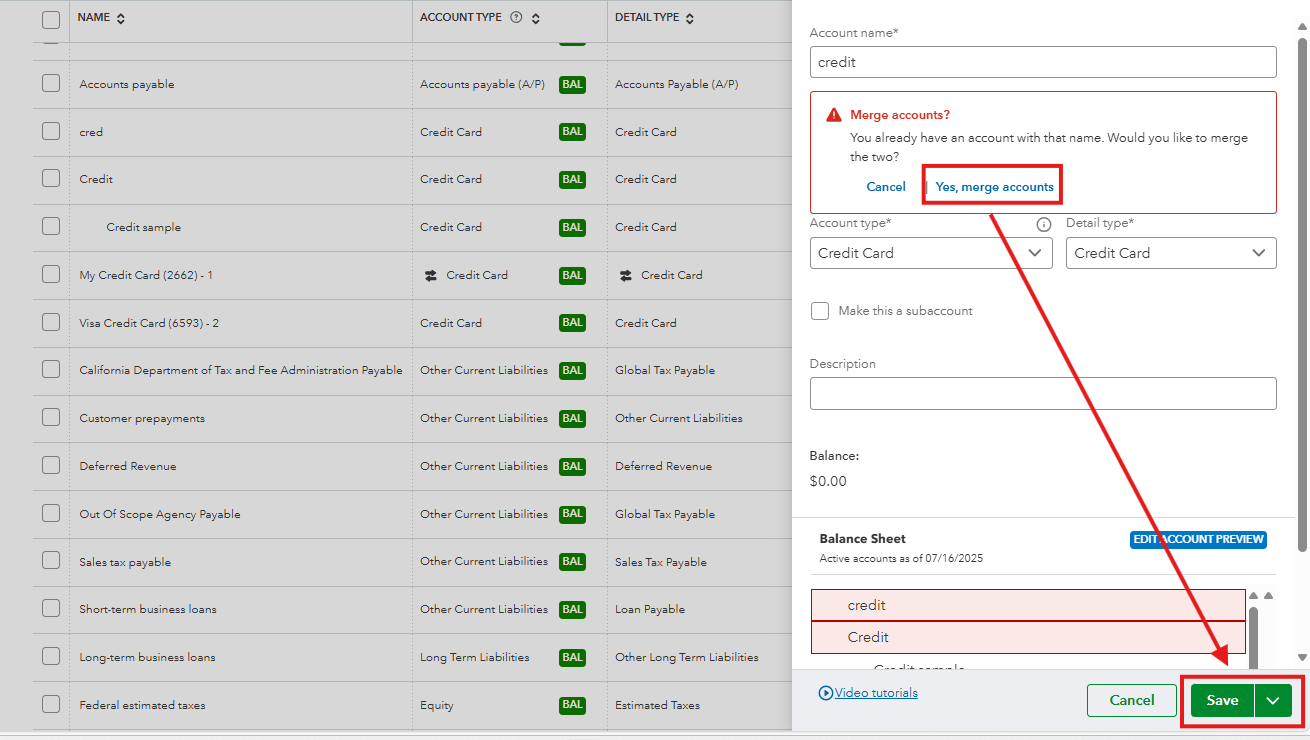
Once done, all the transactions will now be available inside the credit card account that you choose to keep. Feel free to visit this page for more insights about the process:
Merge duplicate accounts.
Our QuickBooks Live Expert Assisted is now available and can offer tips and tricks to help you manage bank accounts and transactions. Feel free to visit them anytime.
We're always ready to extend a helping hand in resolving your QuickBooks-related questions or if you need assistance managing bank accounts in your Chart of accounts.


