Get 50% OFF QuickBooks for 3 months*
Buy nowAnnouncements
Simplify payday and set payroll to run automatically on QuickBooks. Explore QuickBooks Payroll
- US QuickBooks Community
- :
- QuickBooks Q & A
- :
- Other questions
- :
- Re: How can I print%2Fsave all invoices for a specific client back to their starting date with us
- Mark Topic as New
- Mark Topic as Read
- Float this Topic for Current User
- Bookmark
- Subscribe
- Printer Friendly Page

- Mark as New
- Bookmark
- Subscribe
- Permalink
- Report Inappropriate Content
How can I print%2Fsave all invoices for a specific client back to their starting date with us
I am having an audit and need to print invoices for 1 client back to when they started with us. Is there a way to print the invoices at one time without having to go into each one?
Solved! Go to Solution.
Labels:
Best answer September 13, 2022
Solved
Best Answers

- Mark as New
- Bookmark
- Subscribe
- Permalink
- Report Inappropriate Content
How can I print%2Fsave all invoices for a specific client back to their starting date with us
I know this is not the answer you are looking for, but how about printing a statement select "Create Statements..." in "Customers" drop down menu. Set Statement Period From range that you want to show information and then select box for "Show invoice items details on statement." You can preview before printing to see if that will work.


- Mark as New
- Bookmark
- Subscribe
- Permalink
- Report Inappropriate Content
How can I print%2Fsave all invoices for a specific client back to their starting date with us
We appreciate your feedback about the previous response, VaTT.
For now, the customer might need to open each transaction so they can reprint them. Aside from that, Kate can also check the Print Later box on each invoice so they are added back in the queue for printing.
Then, follow these steps on how to print them all at once:
- Go to the File menu, scroll-down to Print Forms, and then select Invoices.
- Select all invoices that belong to the customer.
- Click OK, then choose Print.
Feel free to take a look at this article for more details: Batch Print Forms in QuickBooks Desktop.
Let me know if that's all the information you need about printing multiple transactions at once. We're always here to offer our help whenever you need it.
4 Comments 4
- Mark as New
- Bookmark
- Subscribe
- Permalink
- Report Inappropriate Content
How can I print%2Fsave all invoices for a specific client back to their starting date with us
I know this is not the answer you are looking for, but how about printing a statement select "Create Statements..." in "Customers" drop down menu. Set Statement Period From range that you want to show information and then select box for "Show invoice items details on statement." You can preview before printing to see if that will work.

- Mark as New
- Bookmark
- Subscribe
- Permalink
- Report Inappropriate Content
How can I print%2Fsave all invoices for a specific client back to their starting date with us
Yes, @Kate0803, there is a way to print all invoices for a specific client back to their beginning date. I'd be happy to go over the steps with you so that you can complete your task.
You can run and print the Transaction List by Customer report. Thus, you can audit it quickly without having to go through each one. Follow the steps below:
- Go to the Report menu on the upper right side.
- Select Customers & Receivables and choose Transaction List by Customer.
- Click the Customize Report button.
- In the Display section, pick the appropriate Date and Columns.
- Go to the Filters window and type the following in the search box:
- Transaction Type - Invoices
- Name - pick the specific customer
- Detail Level - select All.
6. Customize the other fields that you want to show in the report and hit OK.
7. Click the Print tab on the upper right side.
8. Repeat the steps for your other customers.
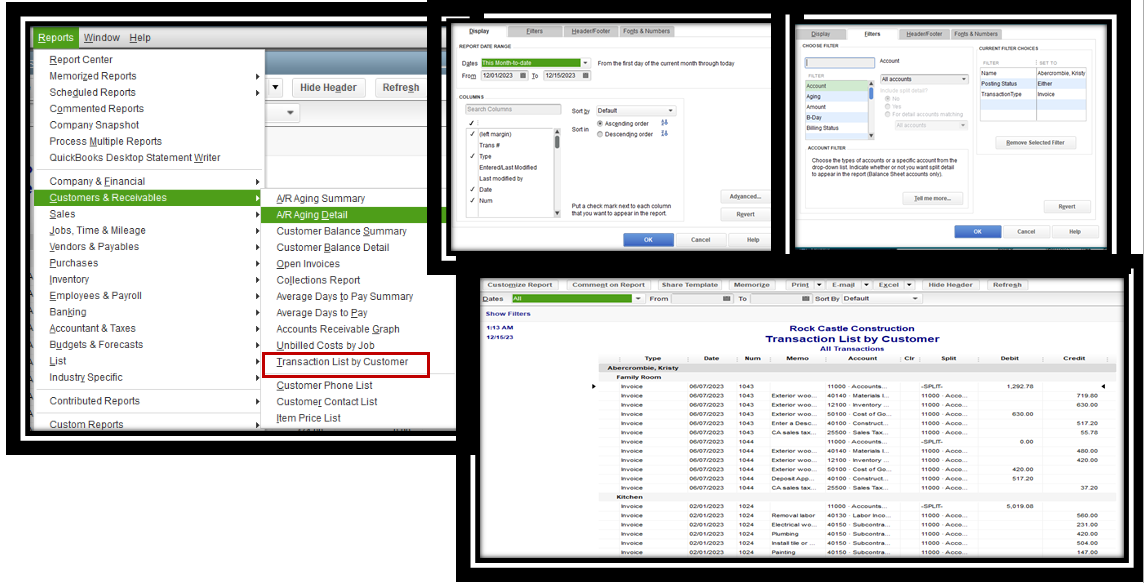
For more information, browse this link: Customize reports in QuickBooks Desktop.
Printing customer statements is a good workaround, as VaTT mentioned above. For complete steps, visit this article: Create a billing statement in QuickBooks Desktop for Windows.
You can bookmark these articles below to learn how how to memorize or combine reports and fix printing issues in QuickBooks:
If you have any additional questions on customer transactions or other subjects, I'm always here to help. Just mention me in the comments box, and I'll respond as soon as I can.
- Mark as New
- Bookmark
- Subscribe
- Permalink
- Report Inappropriate Content
How can I print%2Fsave all invoices for a specific client back to their starting date with us
That is a statement and not all of the individual invoices that Kate0803 was looking for. They need to print the complete invoice and not a summary/statement and were looking for a way to print ALL of a particular customer's individual invoices without having to open each individual invoice and print it from the open invoice. But, thank you for the instructions on customizing a statement.
- Mark as New
- Bookmark
- Subscribe
- Permalink
- Report Inappropriate Content
How can I print%2Fsave all invoices for a specific client back to their starting date with us
We appreciate your feedback about the previous response, VaTT.
For now, the customer might need to open each transaction so they can reprint them. Aside from that, Kate can also check the Print Later box on each invoice so they are added back in the queue for printing.
Then, follow these steps on how to print them all at once:
- Go to the File menu, scroll-down to Print Forms, and then select Invoices.
- Select all invoices that belong to the customer.
- Click OK, then choose Print.
Feel free to take a look at this article for more details: Batch Print Forms in QuickBooks Desktop.
Let me know if that's all the information you need about printing multiple transactions at once. We're always here to offer our help whenever you need it.
Featured

Tired of the frantic, last-minute scramble every December? This session
is ...

The clock is ticking! Before the calendar flips to 2026, you have
essential...

Welcome! Getting your contractor's tax info sorted just got a whole lot
eas...