You can edit categories through the Product Categories section under All Lists, @papadoc8.
Here's how:
- Go to the Gear icon or Settings and select All Lists.
- Choose Product Categories and find the category you want to edit.
- Click Edit and make your changes.
- Once done, click Save.
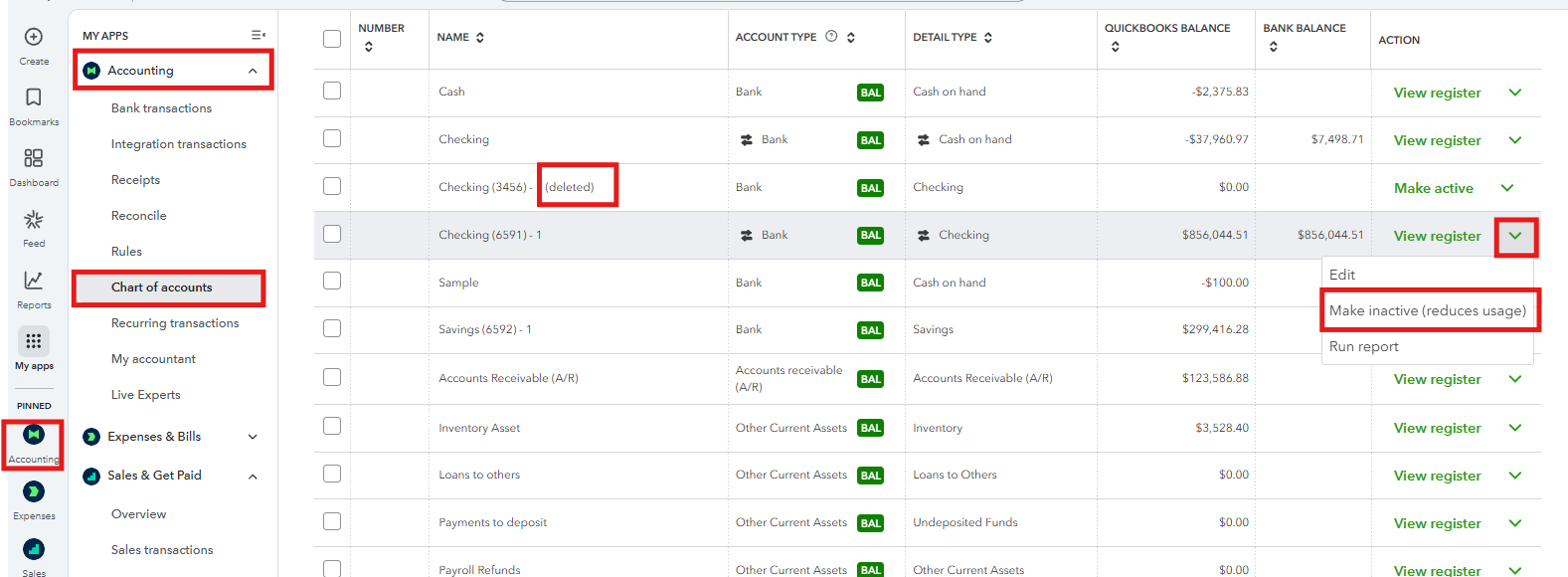
On the other hand, the option to delete accounts in the Chart of Accounts (COA) is unavailable. Instead, you can make the accounts inactive. Here's how:
- Go to the Accounting menu and select Chart of Accounts.
- Locate the account you want to make inactive.
- Click the drop-down arrow next to View register and select Make inactive.
In case you'd like to find your transactions in your account registers so you can view and edit them, refer to this article: Find, review, and edit transactions in account registers in QuickBooks Online.
Also, consider checking out our QuickBooks Live Expert Assisted team. They can help you manage your transactions, accounts, and product categories for efficient processes.
If you're referring to something else, please let us know in the comment section.


