Turn on suggestions
Auto-suggest helps you quickly narrow down your search results by suggesting possible matches as you type.
Showing results for
Get 50% OFF QuickBooks for 3 months*
Buy nowThe business feed area detracts from the information I really want to see on my dashboard. How do I move it to the bottom or get rid of it all together? There is a widget at the very top. If I want to see what's on the business feed, I can click that. I don't need it to be in two places, and I don't want it dominating the top of the dashboard.
I understand the importance of removing the Business Feed, Monica.
The placement of the Business Feed at the top of your dashboard may indeed distract from the key information you want to focus on while working in QuickBooks. For now, you can manually click the X button to temporarily remove the Business Feed option from your view.
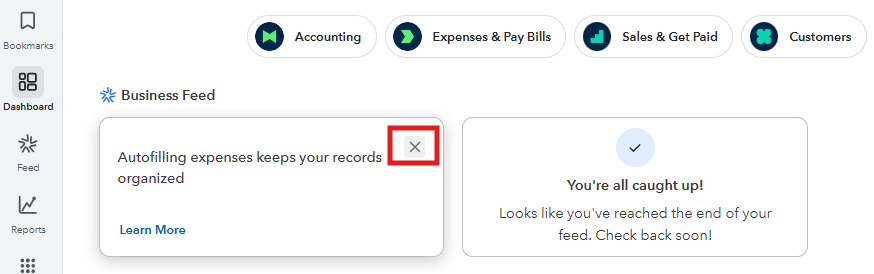
Also, I recommend submitting feedback directly to our engineers so they can consider your suggestion for improving dashboard customization in future updates. Here's how you can share your feedback:
Your input helps us grow and improve, so we encourage you to keep sharing any additional thoughts or suggestions.
If you need further assistance or guidance, feel free to reach out at any time.
simply clicking the x does not remove the business feed it only removes the topic which repopulates everyday. this is not a fix
It could be a good idea for QuickBooks to consider in future updates, Warhawk2. However, there is no option to completely remove the Business Feed from your QuickBooks dashboard.
Clicking the X only hides individual topics temporarily, but the feed itself will repopulate daily.
For now, to minimize distractions, you can customize your dashboard by focusing on other widgets or sections, but the Business Feed cannot be permanently disabled or removed in QuickBooks Online.
I recommend sharing your feedback directly through QuickBooks so they can review it and consider it for a future update.
Here's how:
If you have further questions, let us know in the comments. We're always here to help.


You have clicked a link to a site outside of the QuickBooks or ProFile Communities. By clicking "Continue", you will leave the community and be taken to that site instead.
For more information visit our Security Center or to report suspicious websites you can contact us here


