Get 50% OFF QuickBooks for 3 months*

Buy now
cancel
Showing results for 
Search instead for 
Did you mean: 
Announcements
Simplify payday and set payroll to run automatically on QuickBooks. Explore QuickBooks Payroll
finsecmnbc-outlo
Level 1

how to add the missing reference number for a payroll tax payment to the check register

Used EFTPS to pay payroll taxes. Bank debits account for payment. I use a unique number (date) for the check number. The number is missing in the check register. How to make it show or enter it.

1 Comment 1
MichaelaS
QuickBooks Team

how to add the missing reference number for a payroll tax payment to the check register

You'll need to manually open the tax payment in the register to view the check number, as the unique check number will not automatically display in the check register, Finsec.


Here's a sample screenshot:
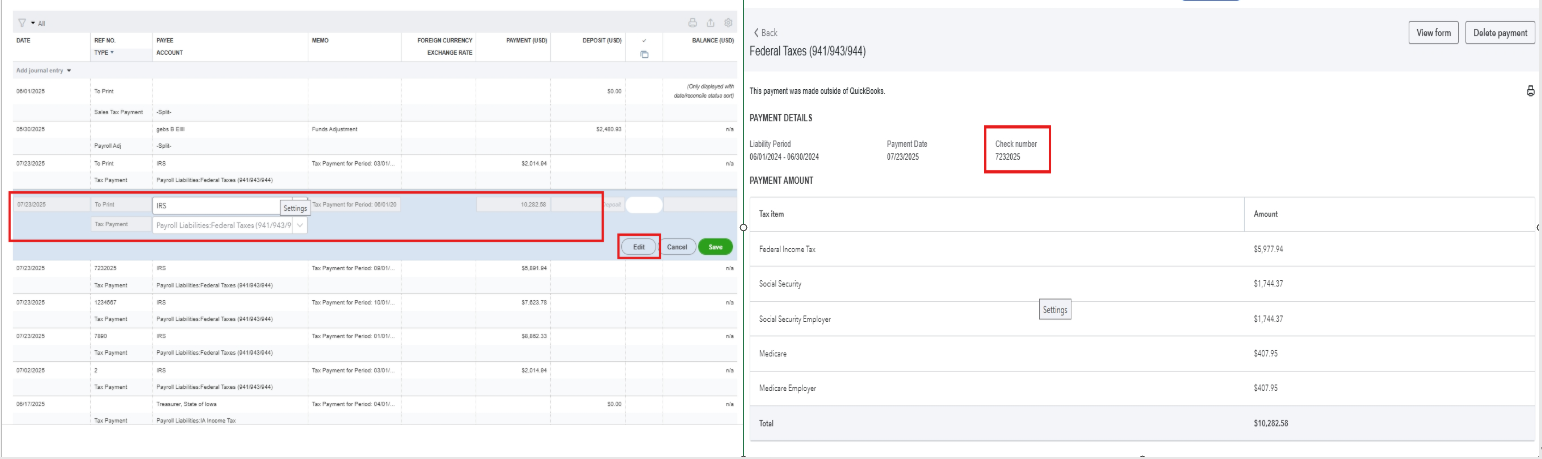


However, if you have already opened the tax payment in the register and find that the check number wasn't entered, you can delete the tax payment and re-enter it to re-enter the check number.


Here's how:


  1. From the Payroll taxes.
  2. In the Payment tab, scroll down to the button and click All Payment History.
  3. Select Tax Payment History, then tap the taxes you want to edit.
  4. Hit Delete Payment button.
  5. Once done, go back to the Payment tab, locate the deleted payment, pay it, and re-enter the check number.


Please let me know if you have other questions or concerns.

Need QuickBooks guidance?
Log in to access expert advice and community support instantly.

Need to get in touch?

Contact us