Turn on suggestions
Auto-suggest helps you quickly narrow down your search results by suggesting possible matches as you type.
Showing results for
Get 50% OFF QuickBooks for 3 months*
Buy nowSomehow we got a custom invoice n quickbooks non-profit desktop. I did not create it and it was probably the person before me.
I cannot find how to modify this invoice as I don't have a settings gear icon.
You need to use the Layout Designer
It's great to have you here in the Community, @KellyS9295. I am here to help you customize your QuickBooks Desktop invoice. Rest assured, with my assistance, you'll be able to modify your invoice with ease.
To start with, in your QuickBooks Desktop file, go to the Lists menu, then select Templates.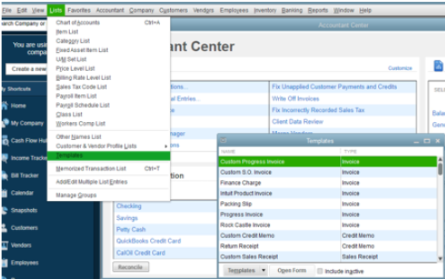
To customize form templates, here's how:
1. To customize an existing invoice template, you need to right-click on it.
2. Select Edit Template.
3. Use the basic customization window to:
4. Go to the Additional Customization to add or remove the items from the header, columns, or footer. Then select Layout Designer to move or resize items on the form.
5. When you’re done, select OK.
6. Then Print Preview to see your form. If everything looks good, select Close.
7. Click OK.
In the event that you run into problems while using and customizing templates, you can check: Fix common issues.
Here are some tutorial videos to help manage your invoices effectively:
If you need any further assistance with customizing your template, just let me know and I'll be happy to help! Have an awesome day!


You have clicked a link to a site outside of the QuickBooks or ProFile Communities. By clicking "Continue", you will leave the community and be taken to that site instead.
For more information visit our Security Center or to report suspicious websites you can contact us here


