Turn on suggestions
Auto-suggest helps you quickly narrow down your search results by suggesting possible matches as you type.
Showing results for
Get 50% OFF QuickBooks for 3 months*
Buy nowI keep getting an error that states, "You need to activate this item before updating the quantity." How do I find the specific item? I cannot make all inactive items active again until I find the errored ones. There is nothing indicating which items need to be made active in order to save the inventory adjustment.

Hi there, Falcon29108.
The error occurs when the inventory item itself is inactive, or when it's part of a bundle and one of the bundle components is inactive.
To resolve the issue, go to the Product and Services page and search for the item. You can include inactive items in the filter (if inactive, click Make Active). Here's how:
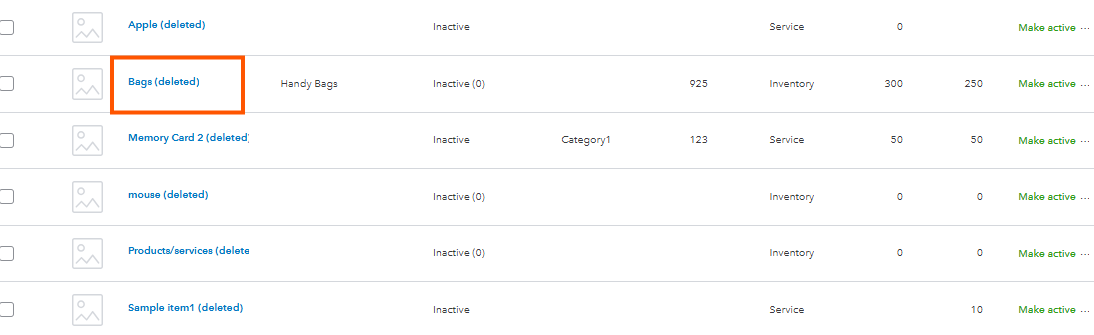
Once items are activated, they will appear on the Inventory adjustment page, allowing you to proceed with the adjustment. For bundle, ensure that every component item in the bundle is active. You can filter the Type of your Product and services page to see Bundle to determine the inactive items.
However, if the issue persists, I recommend reaching out to our support team so they can take a look at your securely review your account and check why this is happening
Let me know if you have any other questions when adjusting inventory. We're always here to help you.
Hi @Falcon29108,
I just wanted to follow up to check if the resolution we provided helped resolve your issue.
Please let us know if everything is now working as expected or if you're still experiencing any problems.
We'll be glad to assist further if needed.
Thanks for checking back! No, the issue has not been fixed. I know how to make an inventory item active and / or inactive.
I was doing the year end inventory adjustment and, after entering all the changes, I get an error stating I have to make items active before I can save the adjustment. There is no where on the inventory adjustment page that shows me which item(s) need to be made active again. I cannot just make all inactive items active again as there are far too many -- then I'd have to make them inactive once the adjustment was saved.
Hi there, @Falcon29108.
I understand the challenge of finding a specific item among numerous inventory items. Let's work together to resolve this issue so you can start adjusting your inventory quantity.
To resolve this efficiently, I encourage you to contact our QuickBooks Online Live Support team. They have specialized tools to investigate this further and sort out your inventory quantity adjustment concern.
Here’s how:
You can check our support hours to see when assistance is available and select a time that’s most convenient to you.
Feel free to add a reply below if you have additional questions or concerns about QuickBooks Online.


You have clicked a link to a site outside of the QuickBooks or ProFile Communities. By clicking "Continue", you will leave the community and be taken to that site instead.
For more information visit our Security Center or to report suspicious websites you can contact us here


