Turn on suggestions
Auto-suggest helps you quickly narrow down your search results by suggesting possible matches as you type.
Showing results for
CYBER MONDAY SALE 70% OFF QuickBooks for 3 months* Ends 12/5
Buy nowWhile we're unable to print a single report showing only the last invoice for each customer directly, we can achieve this by customizing and exporting an existing report, Ricardo.
We can generate the Transaction List by Customer report, which serves as a starting point for this task. It includes all transactions for each customer, allowing us to filter and sort by recent dates and invoices.
Here's how:
1. Go to Reports and search for Transaction List by Customer.
2. Click Customize in the top-right corner.
3. Click on the Run Report button. Then, click the Export icon.
4. Once done, customize the data to reflect the latest invoices and print the file.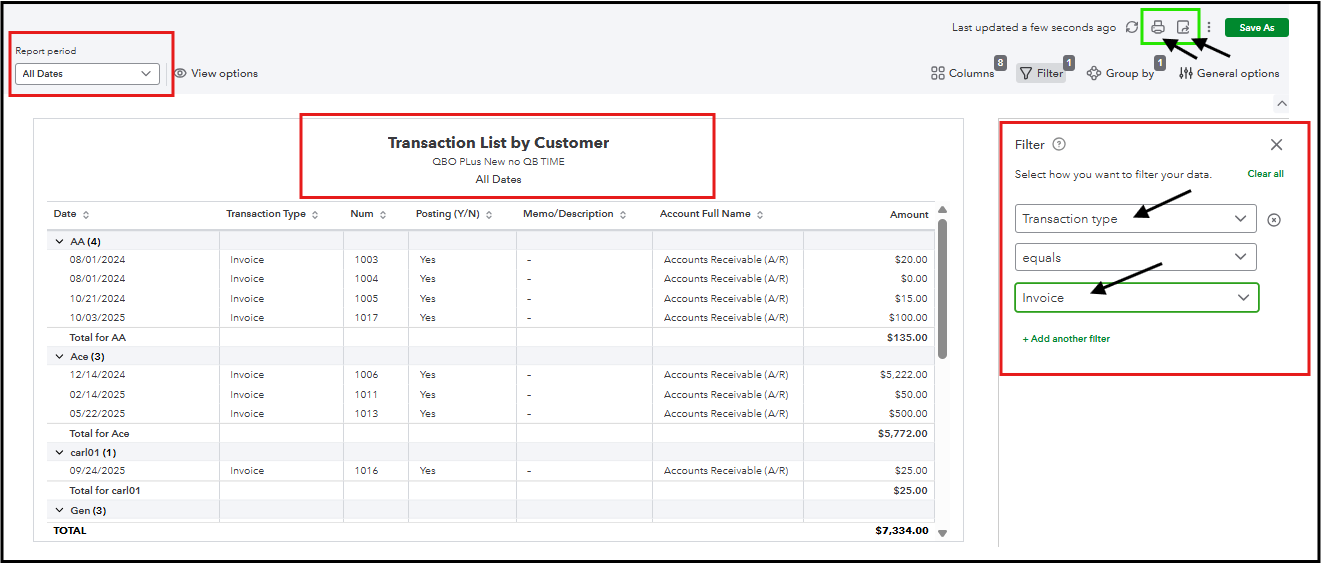
Additionally, to find the latest invoices for each account, go to the Transaction Detail by Account, set the Transaction Type filter to Invoice. Then export the report to Excel, customize the data to reflect the latest invoices, and print the file.
See the reference below:
We are always here to help if you need any assistance.
Good morning, is this a report that I can request even if I have to pay to have it customized for my needs.
Please let me know as it is something that I really need for my business
Look forward to your reply, thanks again,
Ricardo Bartlett
CLEAR VIEW of Eastlake
619-992-3001


You have clicked a link to a site outside of the QuickBooks or ProFile Communities. By clicking "Continue", you will leave the community and be taken to that site instead.
For more information visit our Security Center or to report suspicious websites you can contact us here


