Turn on suggestions
Auto-suggest helps you quickly narrow down your search results by suggesting possible matches as you type.
Showing results for
Get 50% OFF QuickBooks for 3 months*
Buy nowOn the updated App on my Samsung Android phone, I notice three things so far: 1. Email address isn't transferring from Customer Details to sending a sales receipt function. 2. I am unable to add an attachment to a Customer on the app. There is no button or method for this. 3. A sales receipt will detach from a customer on the App if only display name is filled in. Use the first name and last name fields to fix this.

Hello there, Service. Currently, the mobile app doesn't support direct profile attachments or automatic email syncing for sales receipts.
In the meantime, you can access your account through a web browser to continue managing your customer profiles.
In QuickBooks Online (QBO), you can save a customer profile using only the display name without entering the first and last names. However, since this functionality isn't working as expected, I recommend updating the app to ensure proper functionality and smoother management of customer profiles. Here's how:
1. Go to Menu ☰, then click More Options ⋮.
2. Tap Settings, then Refresh Data.
3. Tap YES to complete.
Once done, restart your phone and verify that the display name has been successfully added and remains attached. If the problem persists, you can uninstall the app and then reinstall it to proceed with managing your business seamlessly.
If you need additional help with your QuickBooks tasks, comment below. We’re here to guide you.
So what I am hearing is that a function of the previous app build was removed with the latest update. Intuit left it up to the customer to discover this on their own. How does this serve your customers? Moreover, the function of adding an attachment on a pc as workaround isn't available. I see nowhere that I can do that within a customer file. And your help file to assist with this is out of date.
Hi there, Service. I hear your sentiments about the changes made to the Customer Profile in the QuickBooks mobile app with the recent update.
You can add these attachments through the Notes and Attachments section in the Customer Profile when using a web browser on your computer, as my colleague mentioned earlier.
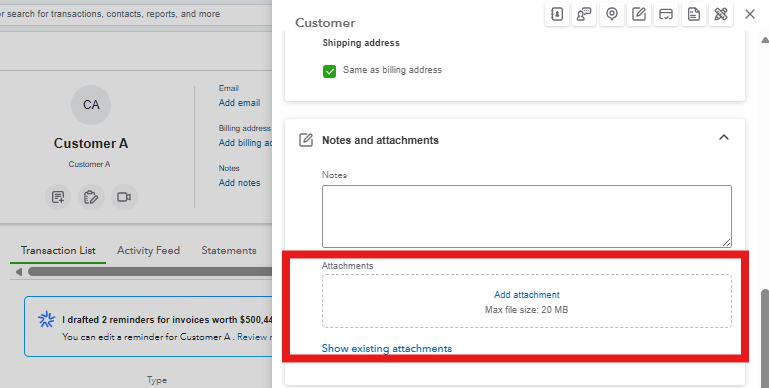
If you need assistance with adding attachments or navigating the process in the web browser, I’ll be here to guide you through the steps or provide additional support.


You have clicked a link to a site outside of the QuickBooks or ProFile Communities. By clicking "Continue", you will leave the community and be taken to that site instead.
For more information visit our Security Center or to report suspicious websites you can contact us here


