Turn on suggestions
Auto-suggest helps you quickly narrow down your search results by suggesting possible matches as you type.
Showing results for
Get 50% OFF QuickBooks for 3 months*
Buy now
I understand how convenient it is to have the option to read the scale automatically in the Shipping Manager, Rimfire.
For now, you can submit feedback to our developers. In that way, they will check it thoroughly and include your request in future updates.
To submit a feedback, here's how:
Keep informed about the latest news regarding your product by checking Intuit's Product Updates webpage.
I’ve also provided a comprehensive resource on shipping items with QuickBooks, which might be useful in the future: Get Started with the new Shipping Manager.
If you have further questions regarding the new shipping manager, feel free to reach out. I'm always here to help.
Did you end up finding something? If not, there is an alternative QuickBooks shipping integration available called StarShip that offers an integration with both QuickBooks desktop and QuickBooks online.
WHERE ARE THE HAZMAT OPTIONS????
99% of our shipments are hazmat. We make chemicals!!!
Thanks QB. You have screwed us.
Now the OLD FedEx shipping hazmat is giving errors.
I have to use FedEx ship Manager to ship things, DOUBLE ENTRY!!!!
Intuit has done NOTHING to improve that "new shipping manager" since June
NOTHING!!!!!!!!!!!!!!!!!!!!!!!!!!!!!!!!
ZERO changes in this pile of CRAP new system since June, and now INTUIT is making us to use this pile of CRAP!!!!!!!!!!!!!!!!!!!!!!!!!!!!!!! as of 12/7....
I suggest in the sort term downloading UPS world ship and FedEx Ship Manager and be prepared to use those systems when basic functionality is unavailable on the 7th. Long term start looking for a new system. In the past 6 months I have done a full ODOO build out and after 15 years am planning on opening QB for the last time on December 24th.
Thanks.
Looking at ODOO now. If it can do lot numbers and expiration dates... great possibility.
I have Fedex Ship Manager but was starting to use QB Shipping. I will not use this new system at all, even for non-hazmat. It's just Pirate Ship or Paypal ShipStation in a wrapper. Junk.
So sick of the lack of progress to fix anything wrong and just keep adding junk so they have a PR post on social media "new feature (that will prob not work just like the previous ones)"
Inventory for Lot controlled items still not fixed.
BUILD assemblies still throws errors and shuts down QB.
Sigh.
Hi Jeff, I was just advised that the old shipping manager is sunsetting Sun 12/7/25 despite the fact that the new shipping manager won’t allow us to use and bill shipments to our customers’ UPS and USPS accounts! This is an unacceptable flaw / feature loss! We absolutely MUST retain the ability to use and bill our own UPS and USPS accounts with the new shipping manager just as we do with the current shipping manager! Pls DO NOT shut down the old shipping manager until this critical functionality is part of and working in the new shipping manager! Thank you!
I have been using the new shipping manager this entire week and the function to bill recipient and third party is now there and functioning.
I'm glad you have it working...
IT is not working for me at all, and yes I have applied updates...
In fact for UPS it will not allow me to select a box... ONLY the UPS boxes... and it is not allowing me to use an address I have been sending for years to.... And It will not allow me to setup defaults. And... It does not like a valid phone number... And etc...
It's likely that you have to remove the dashes " -" between the phone number of where its getting shipped to and don't forget to save next to that section. WTF, most people enter phone numbers that way. The manager was programed by some kid that has never shipped a box in their life. HORRIBLE
OK. We're on QB24. How do we "setup the new shipping manager"? It says we will need to do this, but nowhere does it say how.
Hi BiteMe4, thanks for jumping into the discussion about setting up the new Shipping Manager.
You can set up the new Shipping Manager in QuickBooks Desktop (QBDT) by navigating to the File tab.
Here's how:
For additional information on setting up the Shipping Manager, you can refer to this article: Get Started with the new Shipping Manager in QuickBooks Desktop.
Let us know if you have any further questions or need additional assistance.
I completely agree.
They either had freelance Indian programmers or they let ChatGPT have a go at it.
The Quality is horrid. Looks like eBay shipping except much worse.
Just had an INTRO demo for ODOO by Certum Solutions and holy WOW!
That thing is deep.
I think I have found my replacement for QB. Cheaper too so I can add users. Thanks for the heads up!
I had no idea they existed!
Just had my first international shipment come up and the new shipping manager does not ship internationally so I resend my earlier comments that it’s working well and agree. It is a complete joke.
In the dashboard, even though it shows that I'm connected to my Stamps.com account, when it comes to purchasing the shipping label it only displays the Shipengine wallet. I have funds in my Stamps.com account that are not displaying here. It seems to require that I add funds separately to the shipengine usps account.
The number of times I have to now click my mouse to process a shipping label is much more time consuming. I used to be able to just select "ship" and out popped the label. Now I have to save and confirm the address, pull down the box style, pull down the shipper, pull down the service. After selecting 'purchase label' it opens a new tab in my browser, I have to click that, I have to reference the printer its going to print too, and then press print. When processing dozens of labels, this is a real drag. It takes way longer to run each label.
Has anyone found a shipping integration that works with Quickbooks Enterprise Desktop? We are either looking for a more effective ship manager - like the old version - a if you have suggestion of an optional accounting system we are open to that as well. Efficiency and productivity is key so if you have found something that works please share.
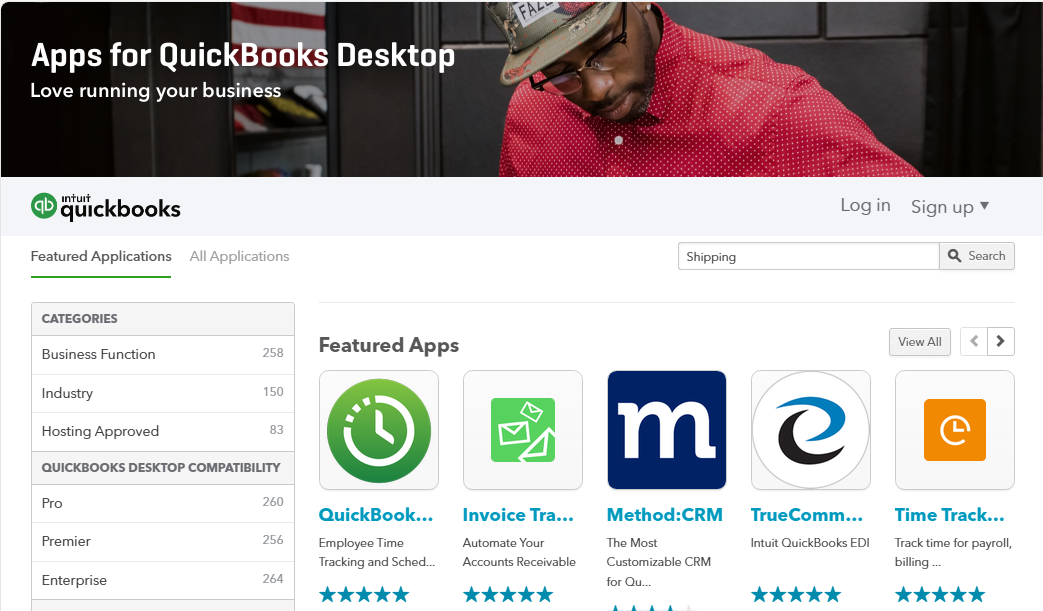
Thanks for joining this thread, Vertex Products.
You can check our QuickBooks Desktop Marketplace for apps which may be able to help you achieve what you're looking to accomplish.
If you're searching for shipping management apps, you can try entering keywords like "Shipping" in your Find Applications field, then select Search to display the results. Once you've found an app you're interested in, you can click to its page for more information about how it works.
I've also included a detailed resource about working with the new Shipping Manager feature which may come in handy moving forward: Get Started with the new Shipping Manager
Please feel welcome to send a reply if there's any additional questions. Have a great Friday!
It has been almost a year since they announced their "improved shipping manager". Intuit has failed properly address the all issues with the new shipping manager so it at minimum, has the the same features as the previous shipping manager.
What an embarrassment of an launch and implementation. Inuit management proves once again they are completely tone deaf.
I agree. Its ridiculously frustrating. They absolutely do not about their customers who rely upon the ability to ship product. The fact that they turned off the legacy UPS and FedEx shipping modules before the new Ship Manager was ready is inexcusable.
If anyone for Inuit is monitoring this forum and actually cares about us, here's a list of the missing functionalities:
1) We cannot create a return shipping label of call tag
2) Transit time estimates are not accurate
3) FedEx "One Rate" options are not available
4) We cannot create international shipments. We ship to Canada multiple times each day.
5) It does not allow us to activate a second UPS account's negotiated rates.
adding to @TimL list:
-ditto on inaccurate transit times.
-when multiple parcels are included in one shipment, it only provides and pastes 1 tracking # ...I have to manually enter tracking numbers from the printed shipping label onto the invoice. I need all tracking numbers for all parcels to be pasted onto the invoice.
-overall it is way less efficient to process a shipping label compared to the old system.
I've also noticed the pricing is wrong. I tried to ship a small UPS package from CA to NJ, and it said the cost would be over $32. That seemed too high, so I did a cost quote on the UPS website, and it said the cost would be closer to $16. So, I guess, the contract price is now higher than usual?
This, I think, can only be done by the Admin account, since I don't have those options. And I'm not an admin.
New Shipping Manager Sucks just like everyone is telling you Intuit!!!
My list includes some of the things already said and no I am not coping them, this is my list which others have same issue with!
1) Does not save customers, time consuming
2) Can not make a return label, have to go to the shippers web site and make it from there, time consuming again
3) If we put in a onetime ship from (to return something) you must save the address which changes your default address.
4) Can not make a label from anything other than an old invoice because we can invoice the customer without know the cost of the shipment 1st, plus we do not invoice without the tracking number on the invoice, also we do not invoice until the product has hit the carriers hands.
5) If we have more than one email address in our system for a customer we have to take time and delete all but one. Time consuming again
6) The phone number can not contain any thing other than numbers, again time consuming
7) Why did we have to put a credit card on file with USPS? We don't use USPS to ship products!
9) It is slow to open again time consuming, takes about 28 seconds every time we make a label or need to get tracking or check to see when the label was made. Again time consuming
10) Transaction ID can not be changed and remember we make (purchase) a label from an old invoice.
11) We have 3 people that make labels in our company, we have zero clue who made that label, at least the old system, we couldn't see the other shipping, but do like everyone can see all the shipments (the only good thing)
12) Each page only has 5 shipments, so scrolling through the pages to find something is again time consuming a frustrating.
13) To print or save a label it opens a browser which then we need to close.
14) When we are shipping multiple shipments to one customer it only shows on tracking number. We then have to go to each label and copy then paste each one onto the sales order. Again VERY time consuming
I am very sure there are more things, but I have spent enough time complaining about this horrible new shipping manager. I REALLY hope someone that can fix most if not all these things reads this major complaint that it seems I am not the only one with complaints about your decision without asking the users 1st.


You have clicked a link to a site outside of the QuickBooks or ProFile Communities. By clicking "Continue", you will leave the community and be taken to that site instead.
For more information visit our Security Center or to report suspicious websites you can contact us here


