Turn on suggestions
Auto-suggest helps you quickly narrow down your search results by suggesting possible matches as you type.
Showing results for
Get 50% OFF QuickBooks for 3 months*
Buy nowWithin the mobile app, when searching for a specific open invoice and even referencing the number i.e. ‘1297,’ the search yields zero results despite definitely still having an open invoice 1297. If I painstakingly go through the filters, select in the date range ‘This Week’ etc, it suddenly appears. How can I get QuickBooks to address this massive glitch?
Since you're still unable to find the specific invoice even after confirming the invoice number is correct, @msivcraft, let's troubleshoot your mobile app to fix this issue.
First, please ensure your QuickBooks app is updated. Next, let’s refresh your data to ensure you have the latest information available in your QuickBooks Online (QBO) app. Here’s how:
For Android:
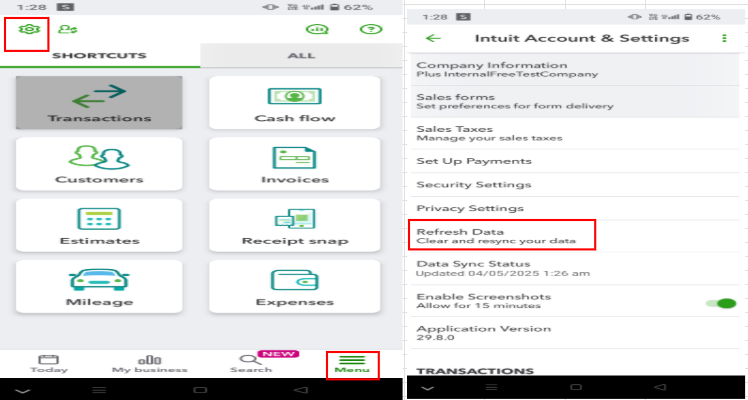
For iOS:
If you still can't find the specific invoice, consider uninstalling and reinstalling the mobile app to ensure you have the latest version of QuickBooks.
You can also refer to this article for guidance on how to receive and record invoice payments in QBO: Record invoice payments.
We'll be around to help you if you have any other concerns about the mobile app or invoices.
Hi Clark,
I have already performed the steps you outlined probably 5-6 times in the past several months with no resolve, however I attempted them again. Upon reinstalling the app the issue is still not resolved.
This has been an ongoing issue (among many others) I have repeatedly run into with the QB mobile app. I've submitted so many support tickets and received emails confirming the issue has been "resolved" when it has not. Surely I cannot be the only customer experiencing this.
Who can I talk to and/or what are the next steps? I am unable to effectively run my business if I cannot access basic data from within this glitchy app. Thanks.
I have already performed the steps you outlined probably 5-6 times in the past several months with no resolve, however I attempted them again. Upon reinstalling the app the issue is still not resolved.
This has been an ongoing issue (among many others) I have repeatedly run into with the QB mobile app. I've submitted so many support tickets and received emails confirming the issue has been "resolved" when it has not. Surely I cannot be the only customer experiencing this.
Who can I talk to and/or what are the next steps? I am unable to effectively run my business if I cannot access basic data from within this glitchy app. Thanks.
I appreciate you trying the troubleshooting steps provided above, Msivcraft. I understand this can be concerning, especially when it's a recurring issue that affects your business's daily operations.
Since the issue persists, I recommend contacting our Live Support team directly. They can help you determine the cause of the problem with the invoice results and provide updates on what to do next. Here's how:
When you reach them, inform them of the steps you have already taken. It will help them provide direct assistance.
Here are our support hours. Although it didn't mention the QuickBooks app, it will help you access assistance during specific times.
Solopreneur, Simple Start, Essentials, Plus
Advanced
Let us know in the comments below if you have any other questions about QuickBooks.


You have clicked a link to a site outside of the QuickBooks or ProFile Communities. By clicking "Continue", you will leave the community and be taken to that site instead.
For more information visit our Security Center or to report suspicious websites you can contact us here


