Turn on suggestions
Auto-suggest helps you quickly narrow down your search results by suggesting possible matches as you type.
Showing results for
Get 50% OFF QuickBooks for 3 months*
Buy nowOur company owns life insurance policies on the company's three managing partners. These are permanent policies that build cash value. The cash value is an asset of the company against which we could borrow if necessary. Or we could surrender the policies in which case the corporation would receive a (potentially taxable) check for the current cash surrender value. We've had these policies for many years, but they have never been reported/tracked in QB. How do we enter the cash value as a company asset in the chart of accounts? How do we maintain the balance as it increases or decreases every year?
Hi nkaster, I see that you wish to record the company's asset and keep track of the annual balance of it in QB. I can provide you with the steps on how to record an asset in the Chart of Accounts (COA) in your QB account.
Here's how:
1. Select Transaction tab under MENU.
2. Go to Chart of accounts.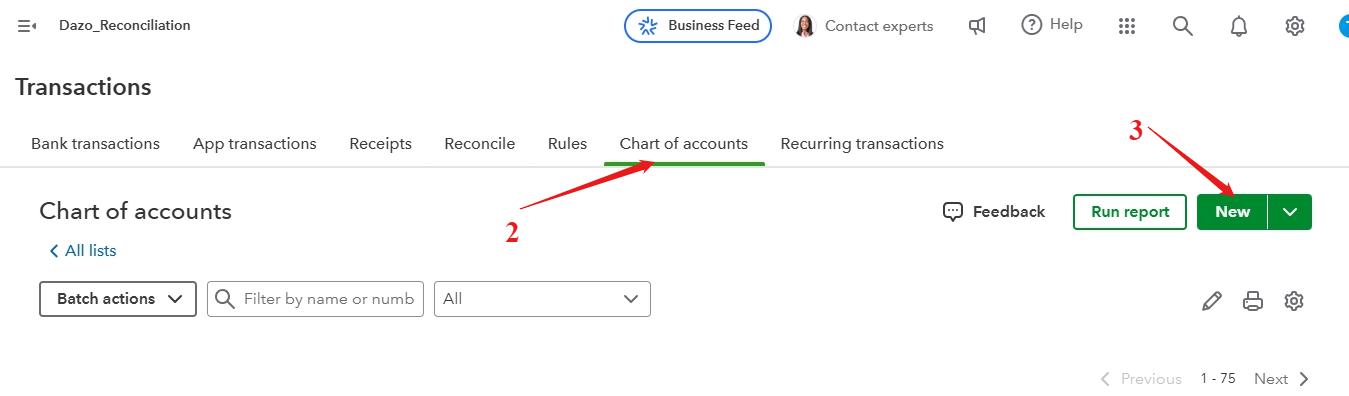
3. Click New button.
4. Enter Account Name
5. Select the Account type.
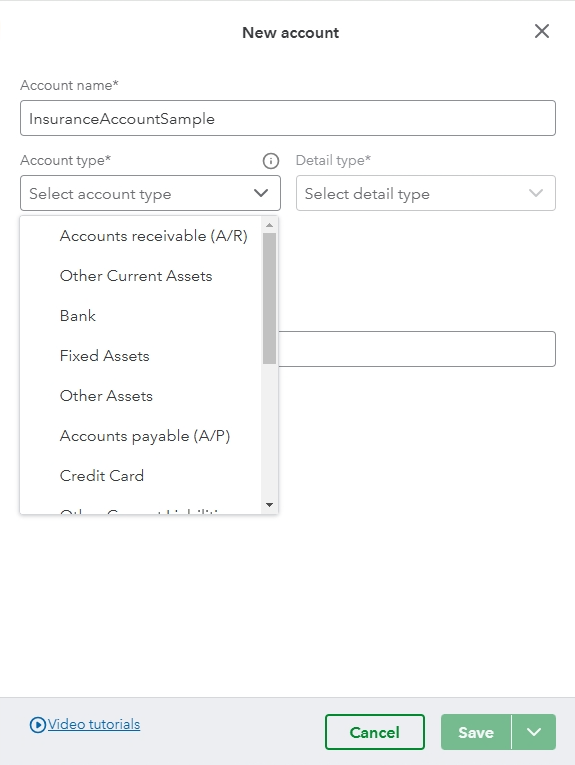
6. Choose Detail type.
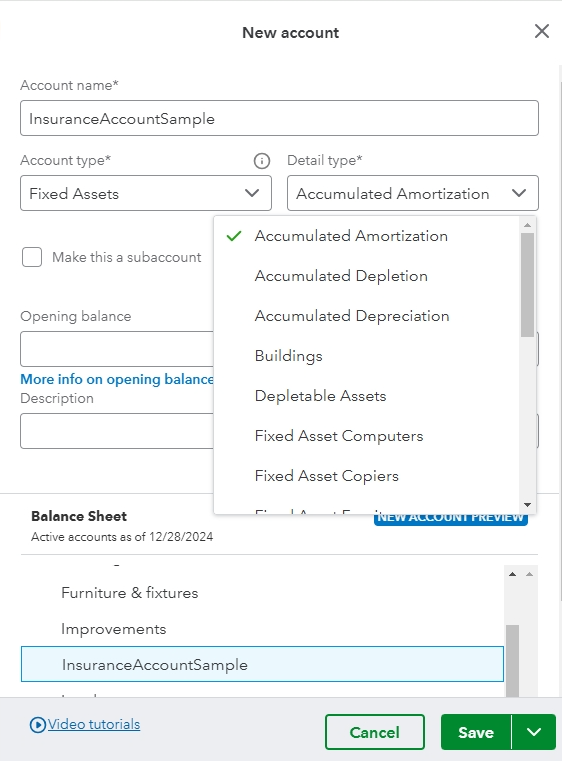
7. Enter the necessary information needed.
8. Click Save.
If you're unsure what account or detail type to use, you can seek assistance from accounting professional. They can guide you in accurately entering the corporate-owned life insurance cash values and ensuring the preciseness annual balances.
You can check this article to know more about how to manage the COA in QB: Manage default and special accounts in QBO chart of accounts.
If you need to add multiple accounts in QB you can enter them on the spreadsheet and import them into the platform. For complete guidance, review this link: Import your COA in QBO.
You may also find this article helpful to easily locate the accounts when needed: Use account numbers in your chart of accounts in QBO.
If you have further questions about recording transactions in the chart of account in QuickBooks, you can hit Reply and leave us a comment. The Community is here to assist you.
Record the annual premium paid, the increase in cash surrender value (CSV), and the difference to your insurance expense account using a journal entry (JE) or check transaction. The difference between the annual premium and increase in the cash surrender value (CSV) is booked as an expense. Let's use the example in a year when your annual premium is $15,000 and the increase in CSV is $7,000. The JE will look like this:
| Debit | Credit | |
| CSV (Asset) | 7,000 | |
| Insurance Expense | 8,000 | |
| Cash | 15,000 |
Or, better yet, record it with a check transaction and list the CSV as $8,000 and Insurance Expense as $7,000.
As far as establishing the correct CSV balance due to the many years of not recording it in QB, the quick and easy way is to make a JE that debits the CSV asset account and credits Opening Balance Equity (OBE). Unfortunately, that kicks the can down the road because you'll want to get that OBE balance off your balance sheet at some point. The bigger issue is that, if the company hasn't been recording the change in CSV, then how has it been recording the reduction in cash from the premium payment and the offsetting expense that should have been recorded each year?


You have clicked a link to a site outside of the QuickBooks or ProFile Communities. By clicking "Continue", you will leave the community and be taken to that site instead.
For more information visit our Security Center or to report suspicious websites you can contact us here


