I understand how the functionality to scan invoices would save much of your time, michellehartnett.
Currently, the ability to use a scanner to enter your invoices is only available in QuickBooks Desktop. For now, the best way to do this in QuickBooks Online is by utilizing a third-party application that offers this feature.
Since we don’t have a specific time frame on when this option will be added, I'd recommend sending a feature request directly to our Product Development team. This helps us improve and update the program.
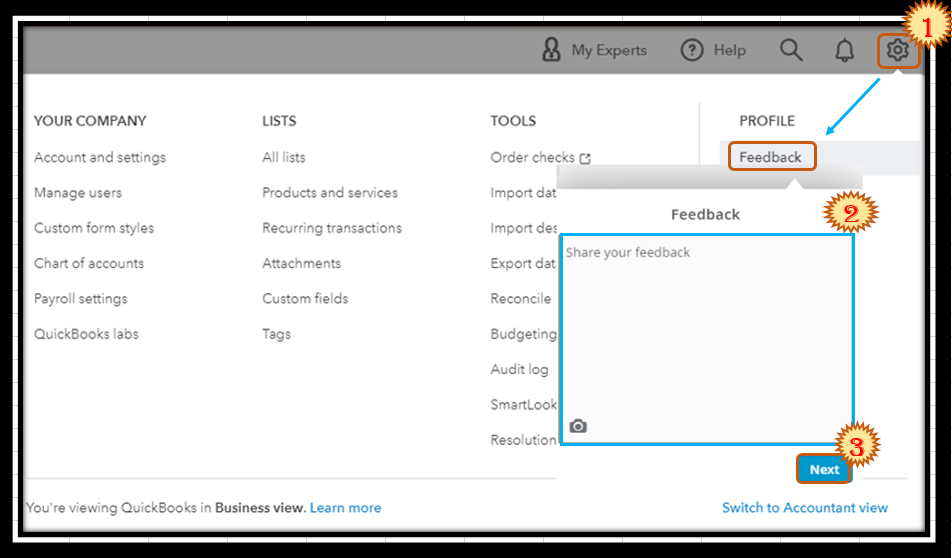
Here's how:
- Go to the Gear menu and then select Feedback.
- Type in your feature request in the description box.
- Once done, click on Next.
You can also track feature requests through the Customer Feedback for QuickBooks Online website.
In case you'd like to upload your receipts and bills to QuickBooks Online, you can easily do this in the program. This helps you save time tracking and recording your vendor transactions. For the detailed steps, please check out this article: Use the Expense Management Feature.
Keep us updated if you have additional concerns or questions about managing your sales transactions. This way, we'll be able to provide the help you need.





