Get 50% OFF QuickBooks for 3 months*

Buy now
cancel
Showing results for 
Search instead for 
Did you mean: 
Announcements
Simplify payday and set payroll to run automatically on QuickBooks.Explore QuickBooks Payroll
Kelly26
Level 2

Transition from Windows App

Is there any sort of guide that helps w/ the transition away from the Windows app?


I used the windows app exclusively and I'm having a hard time transitioning to the browser version.  Not only do you not have short cuts to quickly move from one screen to the next, there are certain functions that I just can not figure out how to do.


For instance Alt F on the app is search for a transaction.   I can't find that functionality at all in the browser version.

1 Comment 1
JasroV
QuickBooks Team

Transition from Windows App

Yes, there is, Kelly.


I'd be glad to guide you in managing your QuickBooks Online (QBO). 


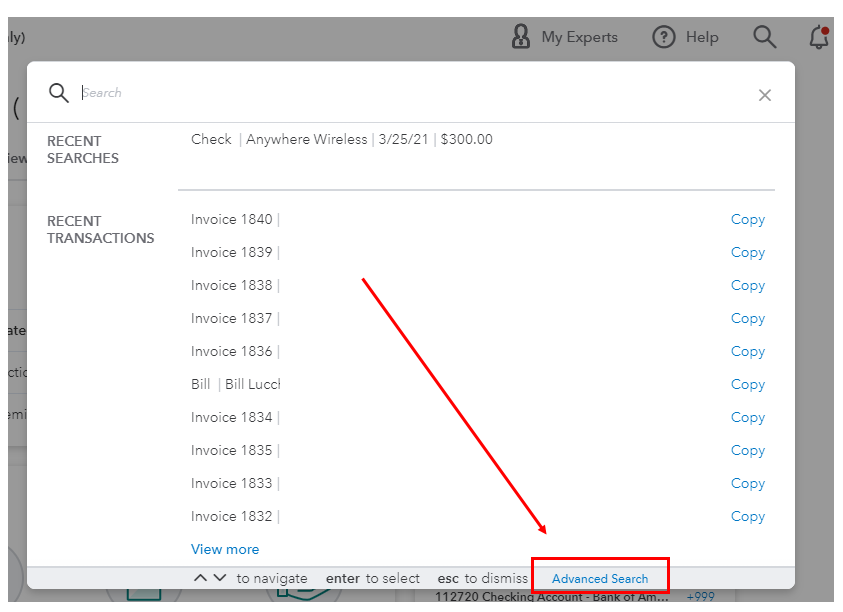
QBO also have keyboard shortcuts to help you navigate the system easily. However, the shortcut key to finding a transaction isn't available. Instead, you can simply search for it using our Advanced Search. Let me show you how.


  1. Click the Magnifying Glass icon.
  2. Enter the date or amount of the transaction you're looking for.
  3. If the transaction you're looking for does not appear on the results list, select Advanced Search.2.PNG
  4. Enter the details to find the entry and click Add Filter.


You can also check this link for more details: Search for transactions.


I've also added this resource that can guide you in knowing your ways around QBO: Video tutorials for QuickBooks Online.


Know that I'm always around to back you up whenever you need help with your QBO. Just leave a reply below and I'll get back to you as soon as possible.

Need QuickBooks guidance?
Log in to access expert advice and community support instantly.

Need to get in touch?

Contact us