Turn on suggestions
Auto-suggest helps you quickly narrow down your search results by suggesting possible matches as you type.
Showing results for
Get 50% OFF QuickBooks for 3 months*
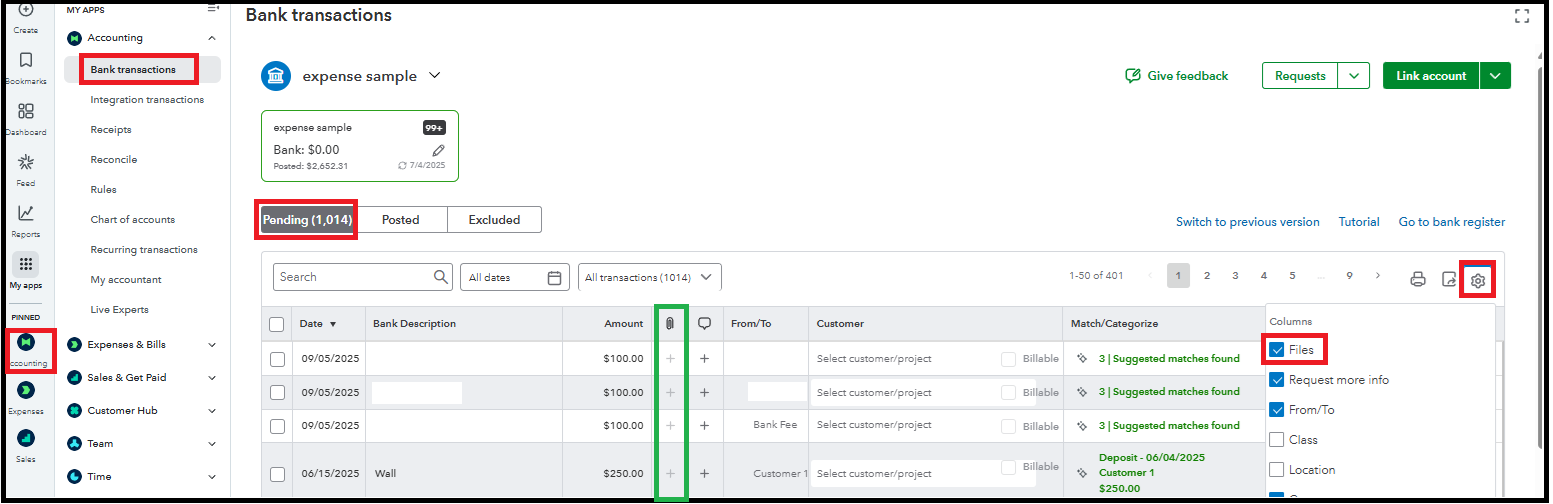
Buy nowYou can add attachments to bank transactions by turning on the Files column option in the settings, @ashley129.
There's no need to post it before adding the attachments, as you can already add it in the Pending page. Let me show you how:
This thread will remain open for questions or clarifications on other QBO concerns. We're always here to help.
Thank you for clarifying where it moved to. I appreciate it.
You're always welcome, Ashley. We also appreciate your taking the time to provide your positive feedback.
We're glad to hear that the information provided above helped you locate the options to add attachments to your bank transactions. Your insights are valuable to us. You can be confident that we'll remain committed to providing the highest level of support.
If anything else sparks your curiosity or you have other QuickBooks Online-related concerns, we'd be thrilled to hear from you again. Just let us know by dropping your thoughts below!



You have clicked a link to a site outside of the QuickBooks or ProFile Communities. By clicking "Continue", you will leave the community and be taken to that site instead.
For more information visit our Security Center or to report suspicious websites you can contact us here


