Turn on suggestions
Auto-suggest helps you quickly narrow down your search results by suggesting possible matches as you type.
Showing results for
Get 50% OFF QuickBooks for 3 months*
Buy nowEver since last weeks update, my Sales Widget is useless. No matter what time period I choose to display, it only shows this years chart. I can no longer choose This Week, Today, Last Week, etc. I have left feedback daily since this has happened to no avail. Just wondering if this is system wide. It shows the same no matter which browser I use and on the desktop app as well.
I will never understand why QB seem to always choose the worst possible time to do updates that cause such headaches for businesses. 5 weeks left in the year. Every year, Q4, they do craziness.

Thanks for taking the time to reach out to the QuickBooks Community, @Finishing Guy.
I hope your day has been great so far.
To clarify, are you saying that the drop down menu to select a different time range is no longer showing? As I have listed in my screenshot below.
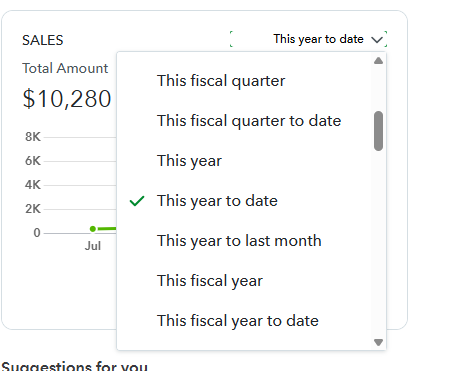
If this is the case, and clearing the cache and using a different browser isn't working for you, I recommend reaching out to our Technical Support Team. Our agents can review your account in a secure environment and investigate this matter further. If needed, our agents can send this issue to our Engineering Team for further review.
In the meantime, please know you can always use a Sales report to review the data you need.
Please don't hesitate to let me know if there is anything else I can assist you with. Take care!
No ma'am. I get the opportunity to choose what info to display, but as you can see by my screenshot, it only shows the full year. I have used 4 different browsers, cleared cookies, history, etc., used the app and incognito mode as well. It is the same. It is this way for everyone an my office.
Good morning, @Finishing Guy.
Thanks for reaching back out and giving us that screenshot to show us exactly what's going on in your mobile app with the Sales Widget.
Since these steps didn't help fix the issue, I recommend contacting our Customer Support Team for further assistance. Here's how:
Please keep us updated on how the call goes. We want to ensure that you're able to get this taken care of as soon as possible. Have a wonderful day!
Candice, the screenshot is actually from QBO through my browser. I have opened in Chrome, Firefox, Duck Duck Go and Edge. I also have the desktop app installed and opened it there. All browsers have the cache and cookies wiped. 7 other employees here are seeing the same thing I shared with you.


You have clicked a link to a site outside of the QuickBooks or ProFile Communities. By clicking "Continue", you will leave the community and be taken to that site instead.
For more information visit our Security Center or to report suspicious websites you can contact us here


