Turn on suggestions
Auto-suggest helps you quickly narrow down your search results by suggesting possible matches as you type.
Showing results for
Get 50% OFF QuickBooks for 3 months*
Buy nowA few months ago I upgraded switched to QB Online Simple Start. I understand that Simple Start is pretty basic and that is usually all that I need. However, now I cannot make customers inactive because of old unbilled charges/expenses that were created in QB Pro Desktop. I've search and searched and typically am directed back to going to 'All Sales' and 'Unbilled Activity', however, I don't have any option to view Unbilled Activity in my All Sales screen (I am guessing this is a limitation of using Simple Start?).
When I filter by customer, I do see some old transactions with a Status of Open and Type of Billable Expense Charge but don't seem to be able to go back and unmark them as not billable (side note, I'm not sure if it is a bug but when I try to filter on the "open" status, it keeps saying that there are no matching transactions, but if I set the status filter to "All" and filter by Customer, I see there are clearly "Open" transactions). When I click on the old Billable Expense Charge, a small pane opens on the right that simply tells me when the Billable Expense Charge activity was created (for some they are over a decade old) and there is an Edit button.
Clicking on the Edit button opens a Billable Expense window which doesn't give me many options. There is a link to the associated Expense and when I click on that, the Expense window opens. If I click on the 'More' button at the bottom, my options are: Copy, Void, Delete, Transaction journal and Audit History.
If I try to delete it, I get a warning that the transaction has been reconciled and deleting changes could put me out of balance. I should also note that the transaction is so old that the Payment Account is inactive as I no longer have that credit card so I also get a warning that says "The transaction is linked to an inactive account."
Here is a screen capture of what I am describing above: https://drive.google.com/file/d/1zkKVd65eSOgtl7C-M_c8xnnHlKilYyeQ/view?usp=sharing
Is it safe to delete the Expense or will it throw my accounts out of balance? Do I have any other options to resolve these issues so I can make old customers Inactive?
An added problem on a similar vane... some old customers have "Time Charges" that are listed as open as well. When I try to edit those, all QBO does is take me to an upgrade page giving me my options to upgrade to a higher level QBO plan. It seems I cannot even delete those if I wanted to?
Hello there, @Brian169.
Thank you for contacting the Community. I would be happy to assist you and provide some insights.
We don't recommend you delete the transaction that has been reconciled since it will cause some discrepancy. QuickBooks Simple Start doesn't have the option for the Unbilled Activity and to edit the time entries.
If you want to have this access, you can upgrade your subscription.
Here's how:
For more detailed steps, please refer to this article: Upgrade or downgrade your QuickBooks Online subscription.
You can also check this article for future reference:
Feel free to reach us out again, if you have further concerns.
What are my options to clear up this issue if I do not want to upgrade? I do not need any of the features beyond the Simple Start version.
Hi, @Brian169.
Since you prefer not to upgrade your plan, I recommend contacting our phone support team for them to provide more options. I know a different way to help you contact our team outside of QuickBooks Online.
Here's how:
Also, you can check out this article to gain insights on how features and data transfer from QBDT to QBO: Learn how features and data move from QuickBooks Desktop to QuickBooks Online.
Please feel free to reach out if you have further concerns about your unbilled expenses. I'm here to assist.
We have QB Online Accountant, we took over and account in May and have still yet to resolve this with QB. FYI.... Upgrade will not help. The old accountant had QB Desktop and I can not get rid of probably over 100 vendors and about 20 ish contractors due to the fact that they are linked to unbilled expenses. The box to uncheck them as billable is NOT there, I spent 4 hours one day on the phone and several on chat to no avail. On July 16, 2024 your so-called experts opened a ticket, I got a reference number (or whatever you call it) and to this day not a single person has reached out or emailed me with a solution or a fix. It is impossible to try to do anything with all of the old "clutter" especially when each accountant before us would just make a new vendor by adding a number behind the name or just put them in and a contractor instead and move forward rather than cleaning it up. These are people and businesses that have not been around for 7 or so years. So, don't waste your money upgrading, because it won't help with anything but drain your bank account.
I completely understand how important it is to address the unbilled expenses in your QuickBooks Online (QBO), @BookkeeperBillpayer. To help you manage this further, let me route you again to the contact support team.
We appreciate you for contacting our support team about this concern. Our dedicated team is fully committed to resolving your issue as quickly as possible and will send you an email update as soon as there’s progress. In the meantime, please feel free to reach out again if you need any immediate assistance. We are here for you, and your satisfaction is our top priority. Here’s how you can reach them:
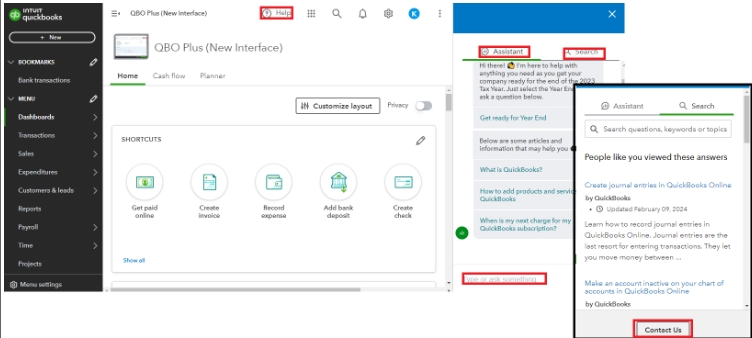
Tracking bills and recording the payments is essential in QuickBooks. For future use, you can scan this article to guide you with entering business expenses in QBO: Enter and manage bills and bill payments in QuickBooks Online.
With their guidance, you’ll be able to resolve this concern. Make this thread active for further assistance or any questions. Keep safe.


You have clicked a link to a site outside of the QuickBooks or ProFile Communities. By clicking "Continue", you will leave the community and be taken to that site instead.
For more information visit our Security Center or to report suspicious websites you can contact us here


