Turn on suggestions
Auto-suggest helps you quickly narrow down your search results by suggesting possible matches as you type.
Showing results for
Get 50% OFF QuickBooks for 3 months*
Buy nowI'm using QB Desktop Contractor 2021. I want a Time by Job Detail report for the current year. When I enter the Customer Name filter that I want, the report shows all customers. Not just the customer I want to see. I tried Time by Name Detail report. When I entered the filter of employee name and current year, I got ALL names and dates. So the filters are not working. This is a new problem as of about 2 weeks ago.
Thanks for your help.
Kay

I appreciate your efforts in trying to isolate your issue in filtering the Time by Job Detail report for QuickBooks Desktop Contractor 2021, @KA24. I'm here to point you in the right direction for further assistance.
Our team has initiated a new investigation (INV-92635) in response to the reports we've been receiving regarding this filter problem on the said report. Rest assured that our product developers are doing their best to fix it as soon as possible.
I suggest contacting our Customer Support team so they can add your account to the list of affected users. This also allows you to receive email updates on the case's status and be notified once it's been resolved. Here's how to get a call or chat from us:
Important: Live support may be limited due to volume. Please take note of the hours of operation to make sure experts are available for assistance.
Alternatively, you can upgrade to the latest release of 2023 to use this feature. I'll show you how:
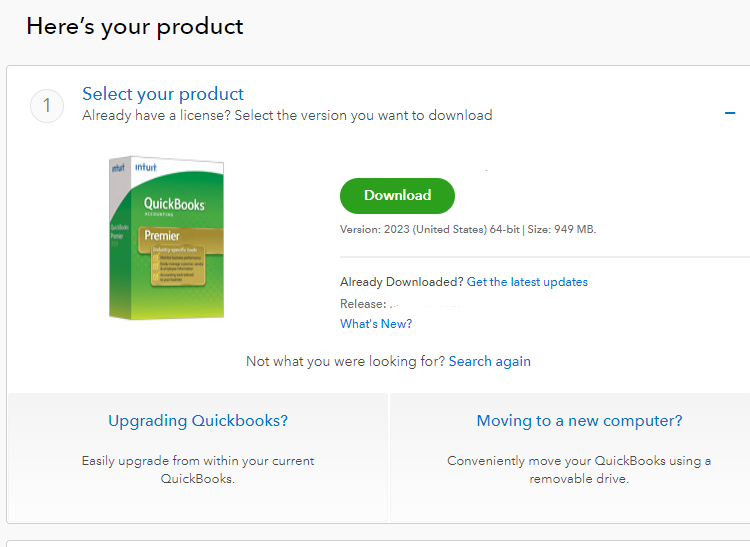
After that, you can install and then activate the program. You can also check out how to fix errors or issues when activating QuickBooks if you run into errors.
For future use, visit this extra guide about handling reports: Create, access, and modify memorized reports in QuickBooks Desktop.
I appreciate your patience as we work through this. If you have any other concerns, please don't hesitate to drop a comment below. Take care!
We're having the same issue and, despite having added my name to the list a few weeks ago, the filters still aren't working. We have Enterprise Solutions: Contractor 2.1 and pay for Gold service. Is there an additional cost involved for us if we update to a newer version?
We understand that your satisfaction and experience with our software are of utmost importance, and we will do everything we can to address any issues you may be experiencing, JeanDSI.
We have recently received reports of issues regarding the Time by Job Detail report for QuickBooks Desktop Contractor 2021. Please rest assured that our team of dedicated software engineers is currently investigating the root cause of this issue and working on a solution with the utmost urgency. We understand the importance of this feature for your business and are committed to providing a timely resolution.
We want to express our sincere gratitude for your patience and understanding during this time. We know your time is valuable, and we are doing everything possible to rectify this matter quickly.
To ensure that we keep you informed about the investigation's progress, I suggest you contact our Technical Support Team. By doing so, you will be added to our list of affected users and receive timely updates via email or SMS. Here are the steps you can follow to reach out to us:
To streamline your communication with our representative, please provide them with the investigation number INV-92635. While we work on resolving the issue, I would like to suggest a workaround for you. Consider upgrading your QuickBooks Desktop Contractor 2021 to the latest release of 2023 to use this feature, or wait for the INV to be resolved in 2021.
You can follow my colleague's steps above on downloading the latest release of QuickBooks Desktop. It's important to keep your software up to date to ensure you're getting the most out of it and working as efficiently as possible.
I just wanted to share some helpful information about keeping your QuickBooks Desktop up-to-date with the latest features and improvements. It's important to stay current with software updates, as they can enhance your experience and improve the program's overall performance. If you're interested in learning more about QuickBooks's manual and automatic update processes, I highly recommend checking out this article: Update QuickBooks Desktop to the latest release. It's filled with useful tips and tricks to make the updating process seamless and efficient.
For future reference, Here's a link to learn more about the reports in QuickBooks Desktop: Understand report.
Please do not hesitate to reach out here in the Community with further questions or concerns. We appreciate your continued trust in our product, and we will keep you updated on any progress made in resolving this matter. Have a great day!


You have clicked a link to a site outside of the QuickBooks or ProFile Communities. By clicking "Continue", you will leave the community and be taken to that site instead.
For more information visit our Security Center or to report suspicious websites you can contact us here


