Get 50% OFF QuickBooks for 3 months*

Buy now
cancel
Showing results for 
Search instead for 
Did you mean: 
Announcements
qb22
Level 1

Why do I not have the Create button to create a custom Contact Form under Leads?

https://quickbooks.intuit.com/learn-support/en-us/help-article/customer-contact-management/contact-f... https://quickbooks.intuit.com/learn-support/en-us/help-article/customer-data/create-manage-contact-f... I am the main admin for our QB account. I have access to the Leads section. Why do I not have the Create button under Leads > Sources? I want to be able to create a Lead Contact Form, so my customers can request more information.

2 Comments 2
Jovelyn_M
QuickBooks Team

Why do I not have the Create button to create a custom Contact Form under Leads?

Hi there, Qb22,


Could you please let me know what you see after clicking on Leads?


You can check the attached photo as a guide to the Sources panel, where you can see the Create Contact form:
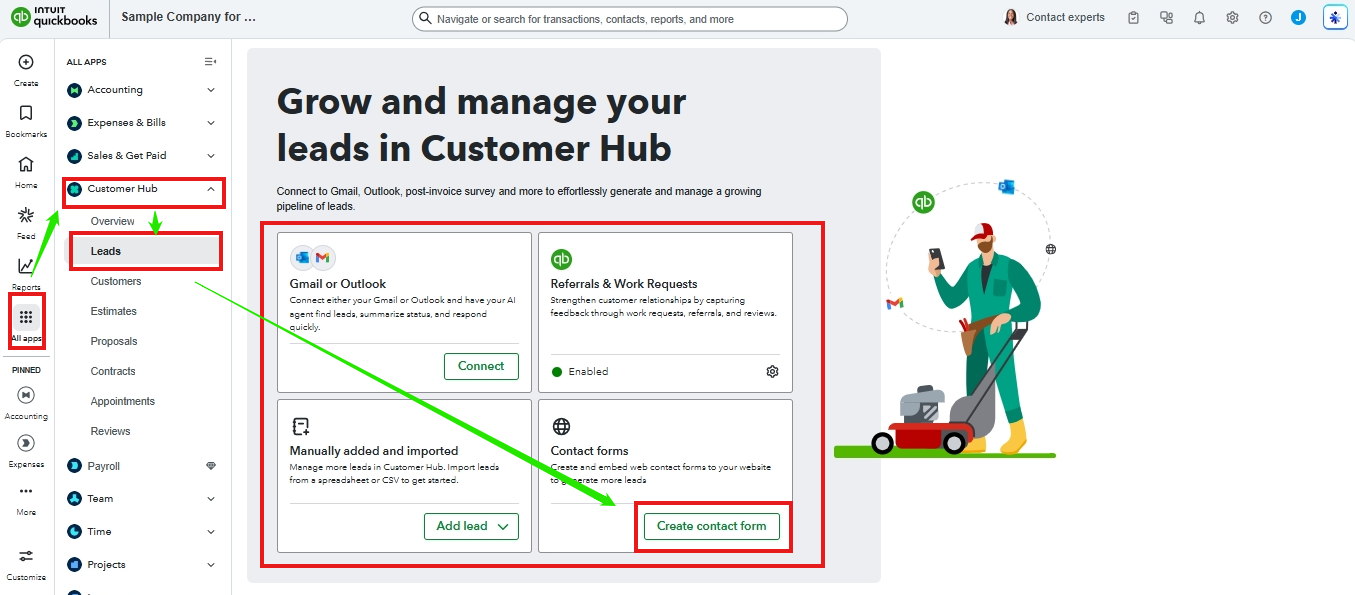


If you still cannot find the option, I suggest logging out and then logging back into your QuickBooks account to ensure a fresh start and resolve any potential issues with your company file.


Alternatively, consider using a private browser to eliminate any cache or extension issues, as outdated or corrupted cache files can sometimes cause display problems. You could also switch to another supported browser to help resolve temporary browser-related issues.


Please know that the QuickBooks Team is always here if you need anything else. 

Jayson_E
QuickBooks Team

Why do I not have the Create button to create a custom Contact Form under Leads?

Hi, Qb22.
 
I’m following up to see if the solution we provided worked for you.
 
Did it resolve the issue, or are you still experiencing difficulties?
 
We're happy to assist further if you need any more help.

Need QuickBooks guidance?
Log in to access expert advice and community support instantly.

Need to get in touch?

Contact us