I'm glad to see you here in the Community, @MickeyT1. I believe that having the function to email your bill payment receipt seamlessly without manually selecting it in the Send Forms section would be a great help in finishing this vendor task, just like a glimpse of an eye.
In QuickBooks Desktop (QBDT) Enterprise, sending bill payment forms to your vendors through email is an integral part of ensuring their awareness of the money they received while having proper documentation of the liquidation of your account payables.
Moreover, the option to send this in bulk can save you a huge amount of time. Since this function is currently unavailable in QBDT Enterprise. We can work on the usual way of sending these receipts to your vendors by selecting them manually in the Send Forms tab.
You can also download it from the Print Forms section and send it to your vendors by hand via personal email. Here's how:
- Go to the File tab, select Print Forms, and choose Bill Payment Stubs.
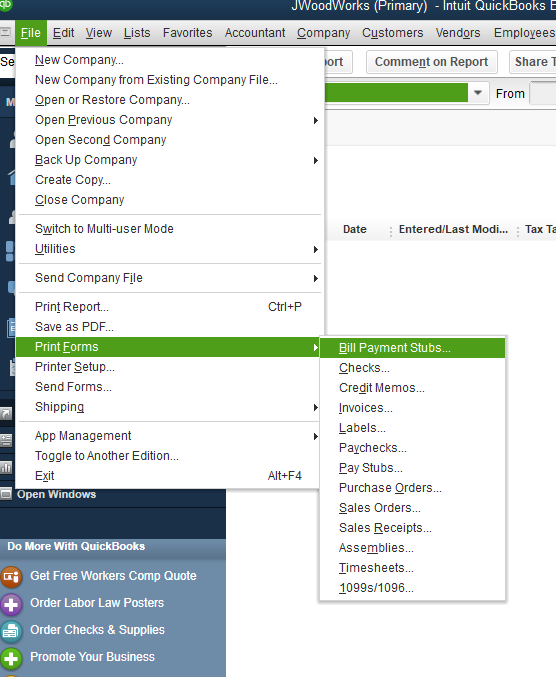
- Ensure the Bill Payment Method, Account, and Dated fields are accurate.
- Once shown below, click Preview and download them there.
In the meantime, you can submit direct feedback to our Product Development Team to review this feature request. If this can improve our user's experience when sending bill payment forms, they can add this to our future product updates.
You might want to express your creativity by choosing how your form templates will be displayed. Consider spending time reading this article: Use and customize form templates.
I hope this helps narrow down your goal in sending your vendor bill payment forms through email. For further questions or clarifications about handling vendor transactions, don't hesitate to return here. I'll get back to you as soon as possible. Have a great day ahead!


