Turn on suggestions
Auto-suggest helps you quickly narrow down your search results by suggesting possible matches as you type.
Showing results for
Get 50% OFF QuickBooks for 3 months*
Buy nowI have an invoice that is listed in one of my reports. When I select the invoice, and hit Ctrl-H, it shows that I applied a payment to that invoice. The payment however is dated prior to the invoice date, and the payment amount appears nowhere in my check register.
Help please on where I should look for the mistake, or should I just delete the original invoice and start all over? I started to do that but I got a warning about payments already being applied, etc., and am afraid of making things worse.
Thank you!

Hello, @Phil51. I'm here to help you see the payment linked to the invoice in QuickBooks Desktop (QBDT).
Before we begin, may I know what specific report you've opened when viewing the invoice? That information is a great help so I can provide a timely solution.
It's possible that the payment is located on the Undeposited Funds account that's why you can't see it on your check register. To check if this is the case let's start by reviewing your preferences. Follow along below to get this done right away:
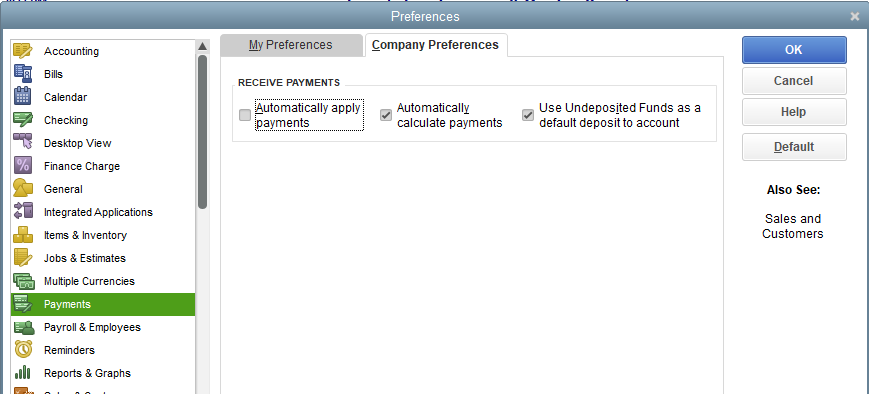
If yes, let's now go to the Chart of Accounts page and open the Undeposited Funds register to see the payment. Here's how:
If you're still not seeing the payment, I recommend running the Rebuild Data tool. This process will help resolve most data integrity issues within your company file.
Let me know how the steps go and feel free to post again here. I'd also appreciate it if you can add updates about this or any additional details regarding your payment concern. I'm just around the corner to lend a hand. Have a good one.
Thank you for your help Divina. I am using Quickbooks Pro 2020 on a laptop.
The deposit I am looking for is not in Undeposited Funds, and yes that is the default location under preferences.
The report i am using is just a memorized report that created filtering out invoices for a specific job.
Thanks for checking back with us, @Phil51.
It sounds like you may have an issue with your memorized report. Over a period of time in QuickBooks Desktop, we can see issues arise with memorized reports (also known as broken reports). Such as invoices and payments showing incorrectly.
With that said, I recommend creating a new report and customizing it to fit your needs. This way, you can get a better scope of the details and see if you are in need of a new memorized report. I think a Transaction Detail report will suit your needs perfectly for the information you're looking for.
Here's how you can create a Transaction Detail report and memorize it:
To know more about customizing your reports, check out this article: Customize reports in QuickBooks Desktop.
That should do it. Let me know how the new report goes. I look forward to chatting with you soon. Take care!


You have clicked a link to a site outside of the QuickBooks or ProFile Communities. By clicking "Continue", you will leave the community and be taken to that site instead.
For more information visit our Security Center or to report suspicious websites you can contact us here


