Hello there, @chadp.
In QuickBooks Online, you can easily review the activity history of an invoice, allowing you to verify if any payments or credit memos are linked to it. Let me guide you through the steps to check.
- From the left menu, hover your mouse over My apps, then choose Sales & Get Paid and Invoices.
- Locate and open the invoice.
- Click each payment linked to the invoice under Invoice activity.
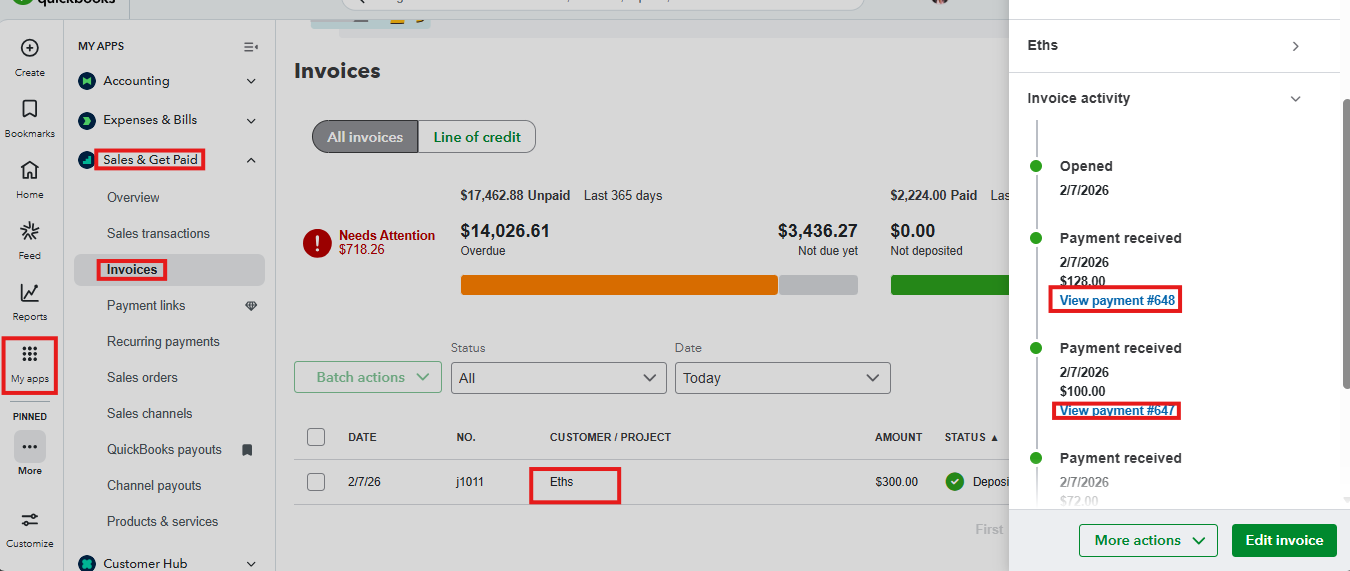
- Scroll down to the Credits section to see if credits have been applied or payments made.
Our QuickBooks Live Expert Assisted service supports managing transactions while offering best practice bookkeeping advice and QuickBooks usage guidance.
Don't hesitate to comment below if you need further assistance managing invoices in QuickBooks Online.


