Please know that QuickBooks does not directly link to crypto wallets or exchanges, @CoryfromCT1.
If your goal is to have an auto-payment option for your customers, this isn't possible. But with the Multicurrency feature, you can manually track your crypto invoice payments or transactions by turning this on and adding the currency.
Here's how:
- In the upper right corner, click the Gear icon.
- Below the Your Company column, select Account and Settings.

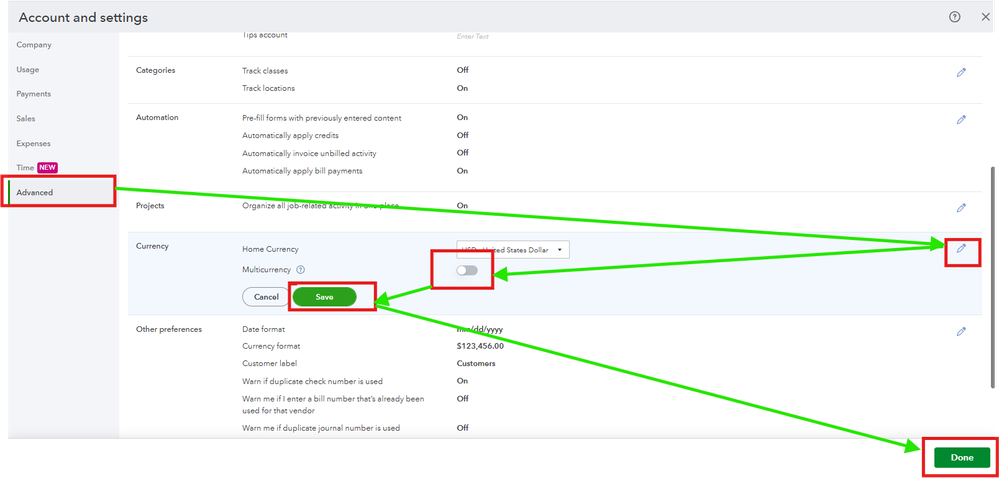
- Go to the Advanced option.
- In the Currency section, select the Edit icon.
- Choose your Home Currency.
- Pick the Multicurrency checkbox and understand that you can't undo this option after enabling it.
- Once done, press Save, then Done.
After that, add a cryptocurrency category in the chart of accounts to categorize it in one place.
Another way around is to look for a third-party application that can achieve this function. You can try to look through by clicking this link and typing in the search field crypto-currency or any keywords: https://quickbooks.intuit.com/app/apps/home/
Let me know if you have additional questions about managing customer payment options by leaving a reply below.


