Let's get this resolved, deeprootsturf. I can provide steps to fix the duplicate bank deposit and debit in your QuickBooks Online (QBO) account.
When your bank accidentally deposits funds twice and afterward corrects the error with a debit, it's best to exclude these transactions from your QuickBooks records.
This process is recommended since it was an error on your bank account and not on your QuickBooks account. Omitting these entries will ensure your financial records remain accurate and unaffected by the bank's error.
Here's how:
- Go to Bank transactions and choose the bank.
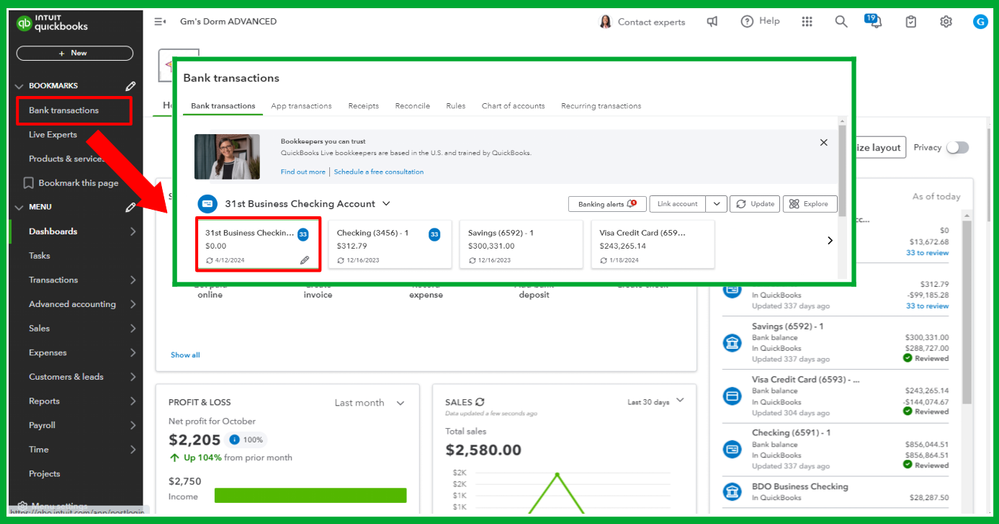
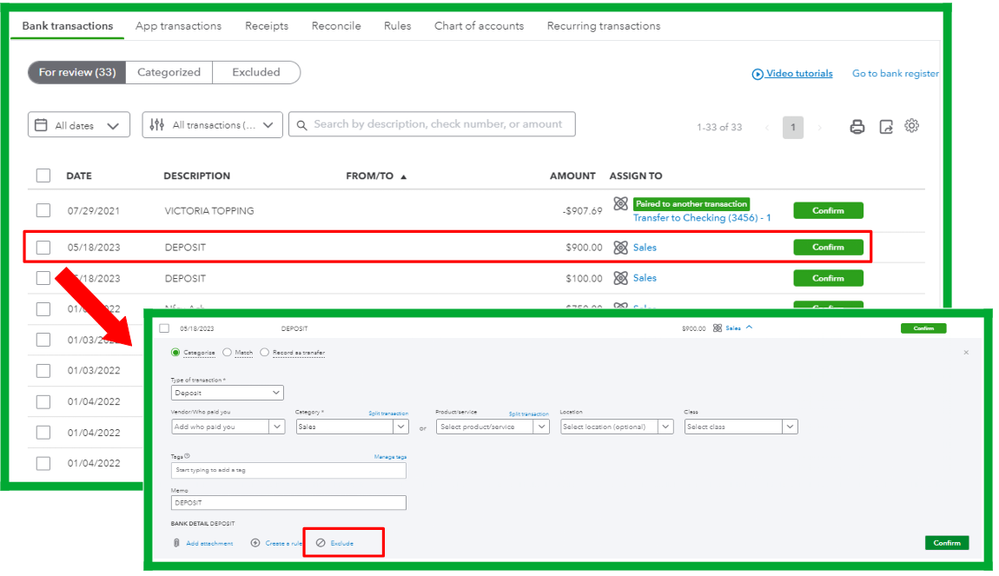
- Find the duplicate deposit and the debit in the For review tab.
- Click the transaction, then hit Exclude.
Moreover, you can check out this article as your guide to reconciling your online transactions: Reconcile an account in QuickBooks Online.
Feel free to tag me in this thread if you have questions about managing duplicate bank deposits and other banking concerns. I'm always here to help.


