Get 50% OFF QuickBooks for 3 months*

Buy now
cancel
Showing results for 
Search instead for 
Did you mean: 
Announcements
Simplify payday and set payroll to run automatically on QuickBooks. Explore QuickBooks Payroll
deeprootsturf
Level 1

Duplicate Bank Deposit/Payment

I have a customer that sent payment via check.  I deposited it into our bank account, however found that my bank deposited it twice.  They reversed the duplicate with a debit to my account.  In my bank transactions in QB, I see both deposits and the debit from my bank.  I applied the original/first deposit to the customer invoice, however don't know what to do or how to reconcile the second deposit and the debit from my bank to clear those transactions?  Any help would very much be appreciated.  THANK YOU!


1 Comment 1
GenmarieM
QuickBooks Team

Duplicate Bank Deposit/Payment

Let's get this resolved, deeprootsturf. I can provide steps to fix the duplicate bank deposit and debit in your QuickBooks Online (QBO) account.


When your bank accidentally deposits funds twice and afterward corrects the error with a debit, it's best to exclude these transactions from your QuickBooks records.


This process is recommended since it was an error on your bank account and not on your QuickBooks account. Omitting these entries will ensure your financial records remain accurate and unaffected by the bank's error.


Here's how:


  1. Go to Bank transactions and choose the bank.
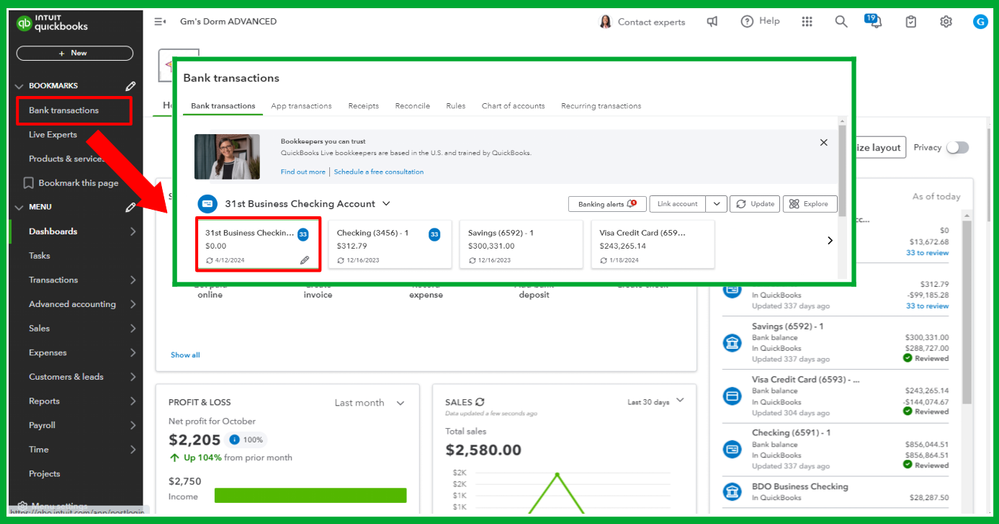
    1.png
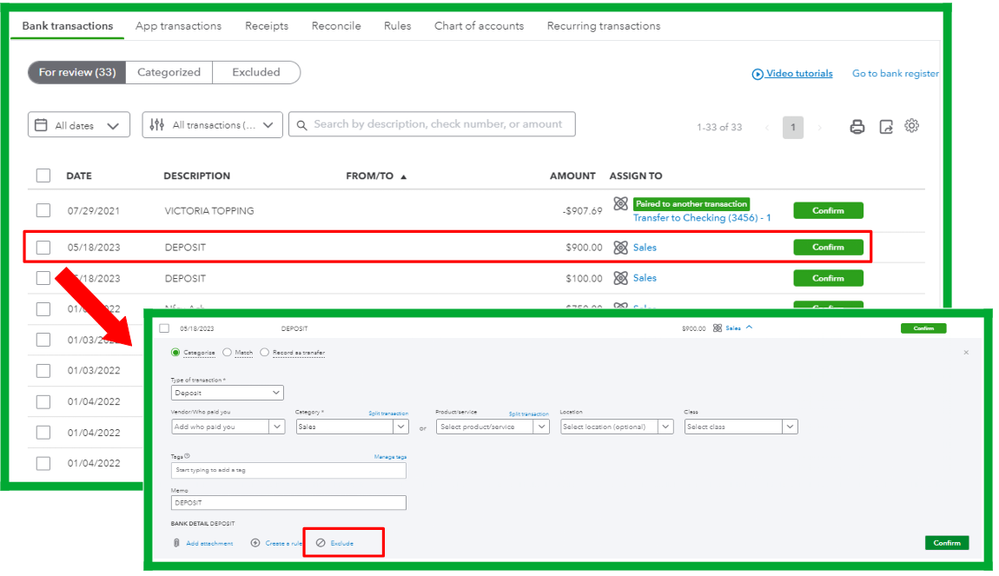
  2. Find the duplicate deposit and the debit in the For review tab.
  3. Click the transaction, then hit Exclude.
    2.png


Moreover, you can check out this article as your guide to reconciling your online transactions: Reconcile an account in QuickBooks Online.


Feel free to tag me in this thread if you have questions about managing duplicate bank deposits and other banking concerns. I'm always here to help.

Need QuickBooks guidance?
Log in to access expert advice and community support instantly.

Need to get in touch?

Contact us