Turn on suggestions
Auto-suggest helps you quickly narrow down your search results by suggesting possible matches as you type.
Showing results for
Get 50% OFF QuickBooks for 3 months*
Buy nowI am new to Quickbooks and was testing a setting called "progress invoicing". After I enabled this setting it prompted me that this would change the template(s). I clicked ok. What ended up happening that I really don't like is it changed the user interface, and removed some features I previously had. I believe what happened was it switched me to the "old estimates experience", and I'd like to know how to switch back to the new one.
This Is what my user interface originally looked like:
I had the ability to create a deposit amount (I still have this enabled in settings). I was also able to save and copy a link to my estimate.
Now the estimate page looks like this:
Any help would be very appreciated! Thank you.

After speaking with the support team and I found out the following:
Currently, there is no way to switch back to the new estimate experience. I was told this WAS something they were working on, but it currently isn't an option to switch back and forth.
This means that the only way to switch to the new estimate or invoice experience is to delete your old account completely and create a new account. This wasn't terrible because I just started the account.
If you pay for one of the higher-end plans, you can also reset your account, resulting in the same thing. Completely starting over.
Hopefully this is changed in the near future!
Hi there, @Mike_User.
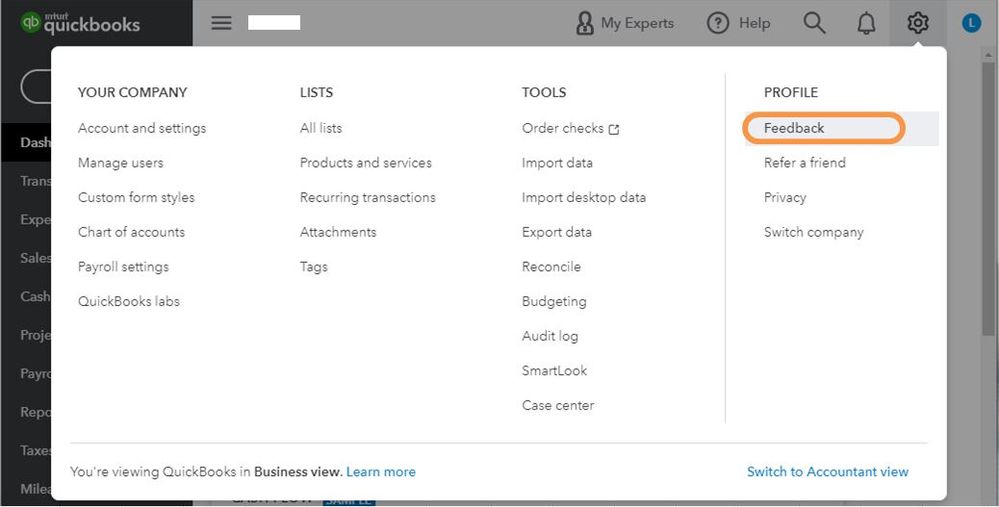
Thank you for sharing your experience here in the Community. I can see how it would be awesome to switch back to the new estimate user interface. Rest assured that I'll be submitting feedback directly to the Development Team to see it reintroduced. I also encourage you to add your vote for this one by submitting a request within QuickBooks.
Here's how:
I'm also adding an article to give your estimates a personal touch to help exemplify your company and what it represents. Head to this link: Customize Forms.
Be sure to let me know how else I can empower you to make QuickBooks work the way your business needs. Thanks for coming to the Community. Wishing you continued success.


You have clicked a link to a site outside of the QuickBooks or ProFile Communities. By clicking "Continue", you will leave the community and be taken to that site instead.
For more information visit our Security Center or to report suspicious websites you can contact us here


