Turn on suggestions
Auto-suggest helps you quickly narrow down your search results by suggesting possible matches as you type.
Showing results for
Get 50% OFF QuickBooks for 3 months*
Buy nowI have a customer who is always late, and I'm not sure I want to continue the relationship. I need to see aging per invoice in a report.

I've had a couple of chronic late-payers myself, and seeing the aging history really helps make that tough call.
Here’s a straightforward way to get what you need in QuickBooks:
Go to Reports, then search for the Customer Balance Detail report. Once there, customize it,
add the Due Date and Open Balance columns if they aren’t already showing. You can also add the Aging columns (like 1-30, 31-60 days, etc.).
But to see exactly how many days late each invoice was before payment, you’ll need to export the report to Excel. Once exported, you can create a simple column to calculate Date Paid minus Due Date for each invoice. That way, you’ll get the actual number of days late, not just the aging bucket.
If you want a quicker overview inside QuickBooks without exporting, you can use the A/R Aging Detail report. It shows outstanding balances by aging period, but it won’t directly show historical payment lateness per invoice after they’re paid.
I usually use a combo: check A/R Aging for current trends, then export the detail to Excel when I need to analyze payment behavior over the years
You can run an Invoices and Received Payments report and filter the customer that you want to check, @spayne3.
Please note that QuickBooks Online currently doesn't have a report that calculates the age of an invoice using its creation and payment dates. But you can view the interval between these dates, which may help you review your customer's payment history.
Here's how:
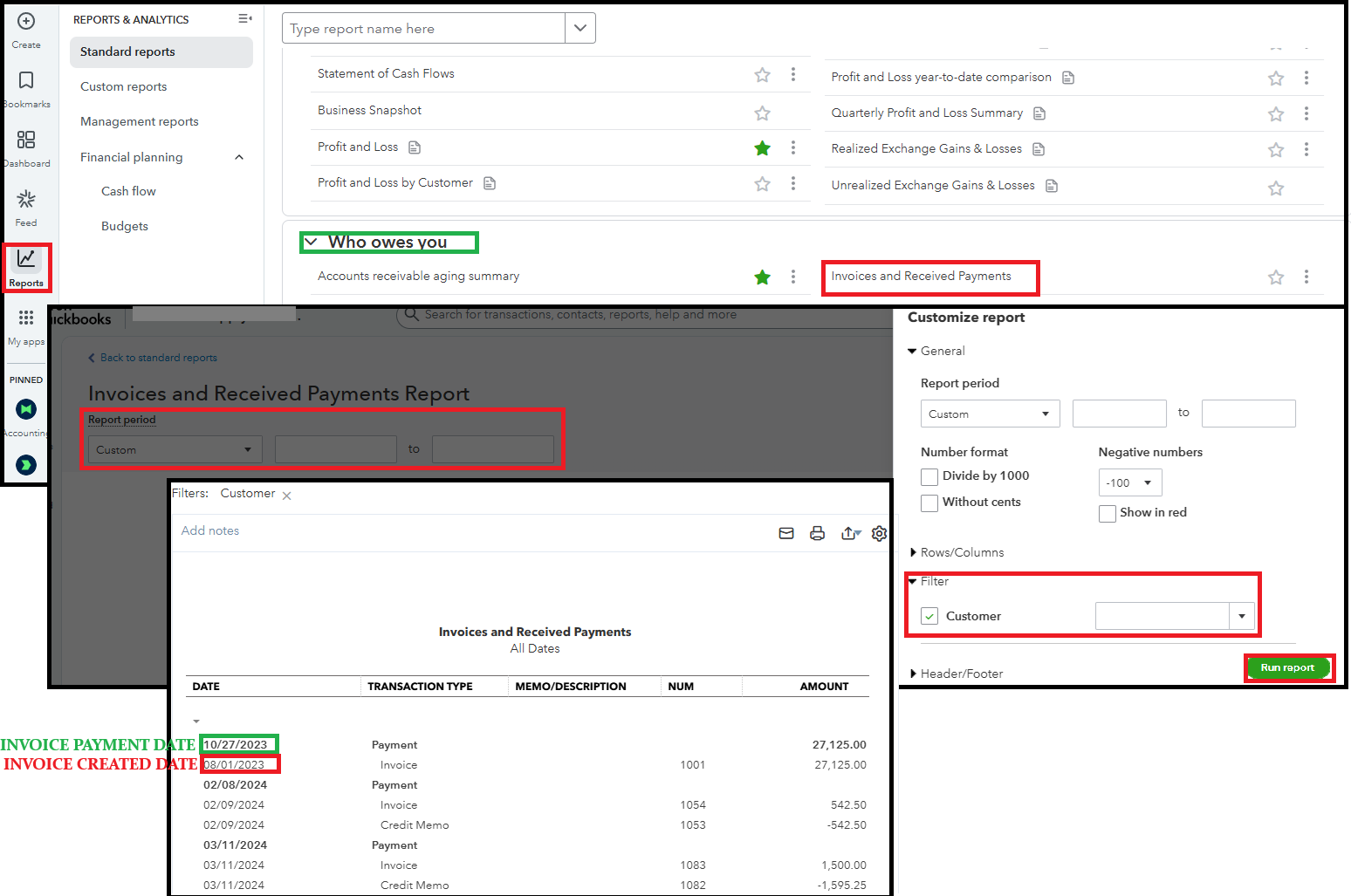
You can also use the report mentioned by Poll and export it to Excel. Add a new column to calculate the number of days between the due date and the payment date, providing clearer insights into payment timeliness.
To simplify managing your financial records in QBO, our QuickBooks Live Assisted team is here to help. They can support you in enhancing your understanding of your business management.
For more assistance with reports in QBO, return to this thread. We are here to ensure you receive the necessary support in managing your business tasks.


You have clicked a link to a site outside of the QuickBooks or ProFile Communities. By clicking "Continue", you will leave the community and be taken to that site instead.
For more information visit our Security Center or to report suspicious websites you can contact us here


