Turn on suggestions
Auto-suggest helps you quickly narrow down your search results by suggesting possible matches as you type.
Showing results for
Get 50% OFF QuickBooks for 3 months*
Buy nowCurrently each time we make a payment via contract payroll- the bank statement only shows it as Payroll/Payroll and no indication as to which contractor received that amount. Is there a way to ensure the bank statement has the contractors name?

Let me route you to our dedicated team, @BMIQ85. They can review your suggestions and consider adding them in the future releases.
Currently, adding the contractor's name to the bank statement is unavailable. I know having this feature will help you identify which contractor received the payment. I would appreciate it if you took a moment to share your feedback with our product engineers. Your suggestions help us build features that benefit you and all our other users.
Go as follows:
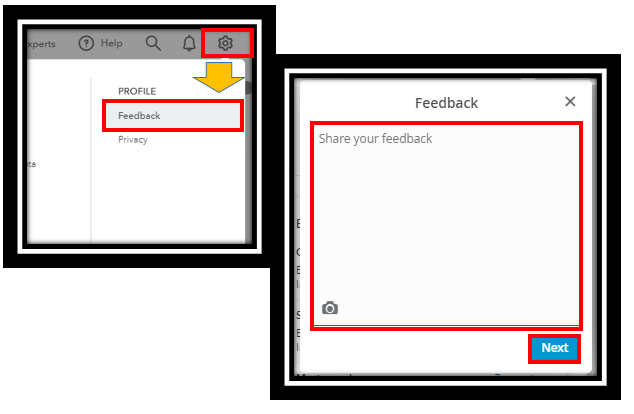
I'd recommend visiting this link: Customer Feedback for QuickBooks. This way, you can keep up with the updates. In addition, you can voice your opinion about what you would like to see in the future of QuickBooks by going to the company website and voting on suggestions.
Also, see this article on what to do if you exceed a limit, a worker has not received the funds, and other direct deposit issues in QuickBooks: Fix direct deposit issues.
The Community always has your back, so please let me know if you have any other questions about the contractor's direct deposit. I'll be more than happy to help. Keep safe.
x double post
It seems my response didn't post.
If I create a bill and choose the contractor as a vendor, will that change the way it appears on the bank statement?
And if I'm able to pay the contractor that way, a) will it still know to include those payments into the 1099 at the end of the year.... or will it see X contractor as two different entities (contractor AND vendor)?
Assuming I could just pay a contractor as a vendor and it still generates 1099... do I even need to be paying extra for Payroll? Confused. But not being able to see who I have paid on my bank statement is a big problem,
Hey there again, @BMIQ85.
Thanks for chiming back in and asking more questions about paying your contractors.
Here are the answers to all of the questions you recently asked:
First Question
We're unable to tell you specifically if paying them as a vendor instead of a contractor will help change the way the bank statement looks for this transaction.
Second Question
As long as you check the box called, "Track for 1099 box" in the vendor profile, the system will still know to include the payments on the 1099.
Third Question
Technically, you don't need the extra payroll to generate the 1099s or file them. Learn more through this guide: Create and file 1099s using QuickBooks Online.
I should answer all of your questions. Don't hesitate to come back if you need anymore help. Take care!


You have clicked a link to a site outside of the QuickBooks or ProFile Communities. By clicking "Continue", you will leave the community and be taken to that site instead.
For more information visit our Security Center or to report suspicious websites you can contact us here


