Turn on suggestions
Auto-suggest helps you quickly narrow down your search results by suggesting possible matches as you type.
Showing results for
Get 50% OFF QuickBooks for 3 months*
Buy nowI ran my balance sheet on cash basis and I have a balance in my accounts receivable account. I ran a report and found several old accounts that have small balances (from 2000-2008). What is the best way to zero out these accounts? If I write them off to bad debt it will show up as bad debt for 2025 and it was actually from several years ago.

Good day, Missmissy.
Since you're using a cash-basis balance sheet, the old accounts receivable balances (2000-2008) shouldn't exist. They represent unreceived income that was never recognized on your P&L. Therefore, you can't write them off as a 2025 bad debt expense, as this would improperly reduce your taxable income for the current year.
The best way to zero out these accounts in QuickBooks Desktop without impacting your 2025 Profit & Loss is to use a General Journal Entry to debit Equity (or Retained Earnings) and credit Accounts Receivable.
Here's how:
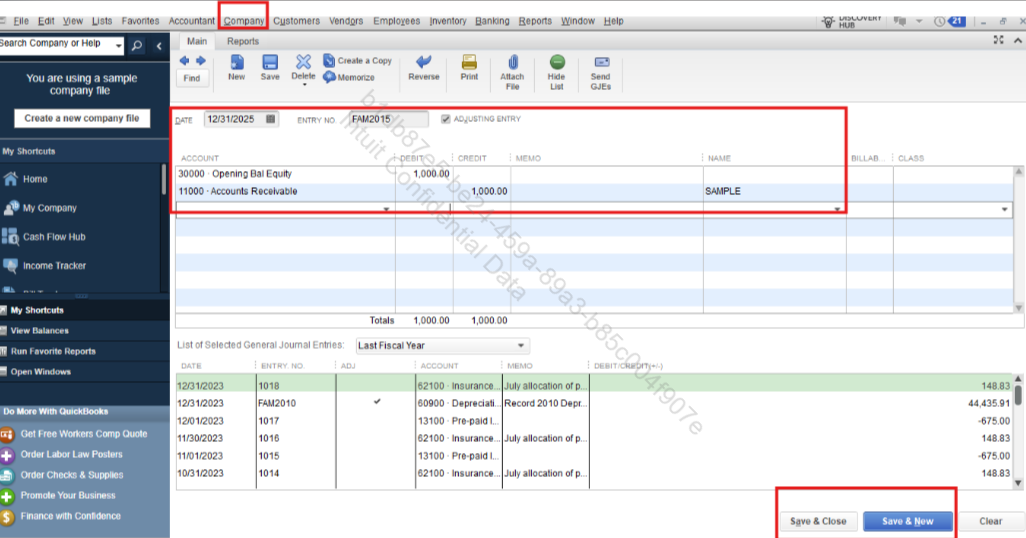
Please note that if the amount is a total for multiple customers, you need to make this journal entry once for each customer, or use a dummy account called Cleanup if you don't need to track the individual names.
You're welcome to return to the Community for ongoing assistance.
Hi @missmissySEI,
I just wanted to follow up to check if the resolution we provided helped resolve your issue.
Please let us know if everything is now working as expected or if you're still experiencing any problems.
We'll be glad to assist further if needed.
Thank you so much for your help. I was actually able to run the report and actually find the problem from the year 2000. The past owner had entered invoices using an inventory item but sold it for a zero dollar price. The inventory price was showing as receivables. It sure does leave a long paper trail when you start to investigate.
Hi, @missmissySEI.
You're most welcome. We truly appreciate you sharing your scenario and thank you for your support.
If you have any further questions, please feel free to reply.


You have clicked a link to a site outside of the QuickBooks or ProFile Communities. By clicking "Continue", you will leave the community and be taken to that site instead.
For more information visit our Security Center or to report suspicious websites you can contact us here


