Turn on suggestions
Auto-suggest helps you quickly narrow down your search results by suggesting possible matches as you type.
Showing results for
Get 50% OFF QuickBooks for 3 months*
Buy nowI used to use QB for credit card processing, but have ceased doing so two years ago. However, when I did, I did not realize that QB put the payment into Undeposited Funds and I manually selected to record the payment by NEW - RECEIVE PAYMENT and selected the customer saw the outstanding invoice and manually selected the bank account that the money went into. Now I have tens of thousands of dollars in undeposited funds.
How do I clear them since they were received and physically deposited at the bank?
Thanks for any help

Good to see you here in the Community, @aquaglino.
In QuickBooks, payments will show in the Undeposited Funds account if you will not deposit them to your bank register. We can start creating a bank deposit to clear your undeposited funds and match the transaction amounts on both your bank statement and in QuickBooks.
Here's how:
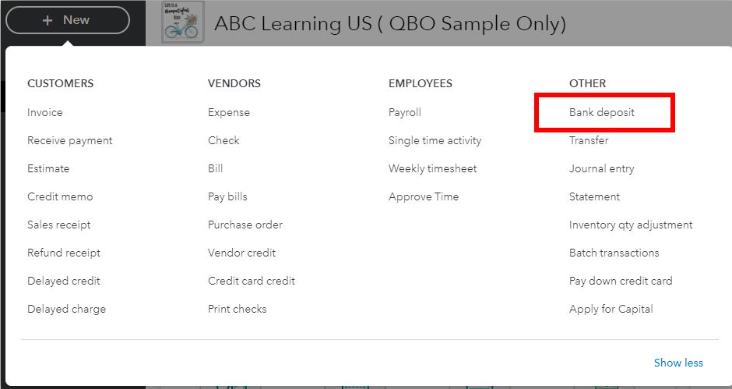
For more information, visit this page: Deposit payments into the Undeposited Funds account. It provides details about how it works, like grouping payments together.
You can refer to the following article about combing transactions in QuickBooks with a bank deposit: Record and make bank deposits in QuickBooks Online.
Once done, you can start reconciling your accounts to match your bank and credit card statements.
I'm just a post-away if you need more help with your credit card payments. Take care, and have a wonderful day.
Thanks for your advice. All of the bank accounts have been reconciled and the transactions in question are from previous years and taxes have been filed. I am concerned about duplicating deposits.
The process that I have done since the first of this year with “bank transfer” payment option for payments that QB put in the “undeposited funds” account was to transfer the amounts to the bank register that the money was actually deposited into. However, they still show up in the “undeposited funds” register and I get a notification that some transactions need to be manually deposited.
I just need to correct this, for there will be no more in the future as QB takes 7-9 days to put the money in my account. I wish I could hold potentially millions of dollars each day in my interest earning account, before sending it to the appropriate recipient. For now I need to figure out how to clean up my books
thanks in advance for any further assistance.
I appreciate you for getting back to us, aquaglino. Let me step in and share additional information on how we can clear out your Undeposited Funds account in QuickBooks Online (QBO).
Before doing so, we need to work with an accountant since we're dealing with old transactions. It's also possible that these are under the closed period of your books.
First, let's remove the transactions in question from reconciliation and delete them from your account. To do that:
Next, let's deposit the payments from your Undeposited Funds account to replace those deleted transactions. Here's how:
Once settled, let's reconcile your account to ensure they're balanced and accurate.
In QBO, there are various reports we can run to tell us about the different aspects of your business. This way, we'll have an overview of your sales, expenses, and other necessary information about your finances.
Please don't hesitate to return to this thread if you have further concerns about clearing your Undeposited Funds account. We're always here anytime to back you up. Have a great day!


You have clicked a link to a site outside of the QuickBooks or ProFile Communities. By clicking "Continue", you will leave the community and be taken to that site instead.
For more information visit our Security Center or to report suspicious websites you can contact us here


