Turn on suggestions
Auto-suggest helps you quickly narrow down your search results by suggesting possible matches as you type.
Showing results for
Get 50% OFF QuickBooks for 3 months*
Buy nowHello, we own a horse training business and we sold a horse for one of our customers. The buyer wrote the check for payment to our business and the check was deposited to our business checking account. Part of the check needs to be applied to the customer's outstanding invoices and the remaining amount returned to the customer. How can I apply a payment to an invoice which was not received by the customer whose name is on the invoice, and how can I post only part of the check to invoice payments, and the rest due to the customer? Any insight on this would be appreciated!
Solved! Go to Solution.

Hi Mol10!
Congratulations on getting a payment! I'll guide you through recording your payment and refund.
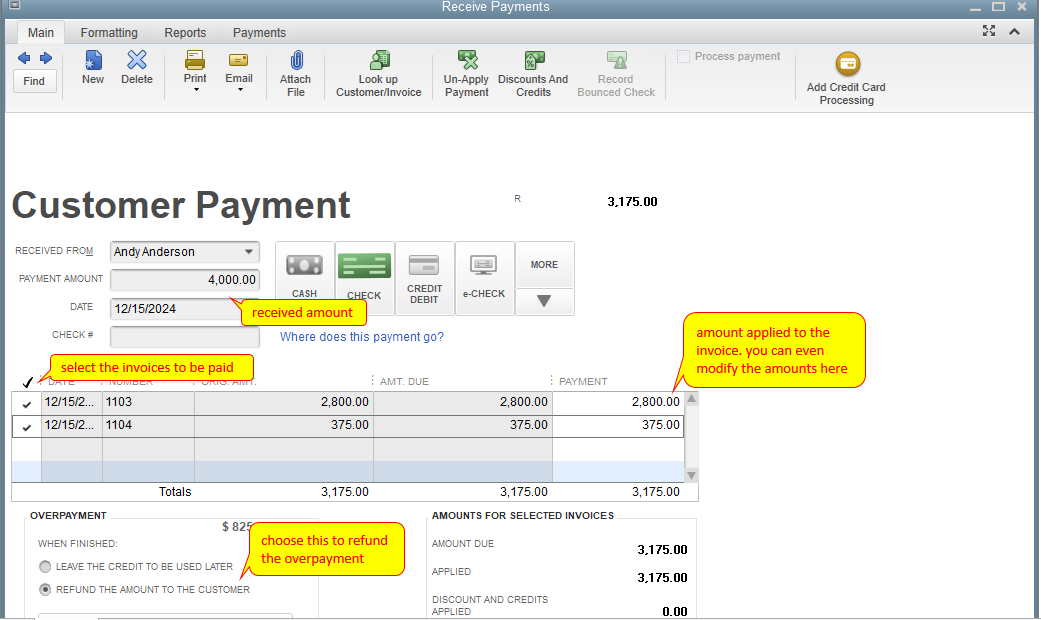
To do this, you can simply click the Customers menu and select Receive Payment. Then, select the customer as a payee and the invoices to be paid. You can even underpay other invoices by modifying the payment amount for each invoice. Upon saving you'll be prompted to enter the refund as a check.
On the other hand, if you want to check some references for QB Desktop, just click the Topics menu above and choose View all help.
Let me know if you have any other questions in mind. Take care and have a good one!
Allow me to chime in, Mol10.
The name doesn't need to be written on the check. You can identify that it's coming from a particular customer just by looking at the note in the memo section.
On the other hand, you can also transfer payments from one customer to another by creating a wash or clearing account. Then move the fund from one account to the other using a journal entry (JE). Check out this article for a complete guide: Transfer customer credit from one job to another in QuickBooks Desktop.
If you're unsure of the debits and credits, I advise working with your accountant to keep your accounts accurate.
You can also read the articles listed below to assist you in recording payments in QuickBooks Desktop:
You can reply to this post if you need anything else in QuickBooks. We're always available to help you.
Hi Mol10!
Congratulations on getting a payment! I'll guide you through recording your payment and refund.
To do this, you can simply click the Customers menu and select Receive Payment. Then, select the customer as a payee and the invoices to be paid. You can even underpay other invoices by modifying the payment amount for each invoice. Upon saving you'll be prompted to enter the refund as a check.
On the other hand, if you want to check some references for QB Desktop, just click the Topics menu above and choose View all help.
Let me know if you have any other questions in mind. Take care and have a good one!
Thank you for your quick response! The only issue I have with this is that it appears to be paid by the customer, when it was paid by another party. Is it necessary to name the party who wrote the check? Would a note in the memo section be sufficient?
Thank you for your quick response JessT! The only issue I have with this is that the payment appears to have come from the customer, when the check was written by someone else. Do I need to name the party that wrote the check? Would a note in the memo section suffice for this?
Allow me to chime in, Mol10.
The name doesn't need to be written on the check. You can identify that it's coming from a particular customer just by looking at the note in the memo section.
On the other hand, you can also transfer payments from one customer to another by creating a wash or clearing account. Then move the fund from one account to the other using a journal entry (JE). Check out this article for a complete guide: Transfer customer credit from one job to another in QuickBooks Desktop.
If you're unsure of the debits and credits, I advise working with your accountant to keep your accounts accurate.
You can also read the articles listed below to assist you in recording payments in QuickBooks Desktop:
You can reply to this post if you need anything else in QuickBooks. We're always available to help you.
Thank you!


You have clicked a link to a site outside of the QuickBooks or ProFile Communities. By clicking "Continue", you will leave the community and be taken to that site instead.
For more information visit our Security Center or to report suspicious websites you can contact us here


