Turn on suggestions
Auto-suggest helps you quickly narrow down your search results by suggesting possible matches as you type.
Showing results for
Get 50% OFF QuickBooks for 3 months*
Buy nowTransfer fees

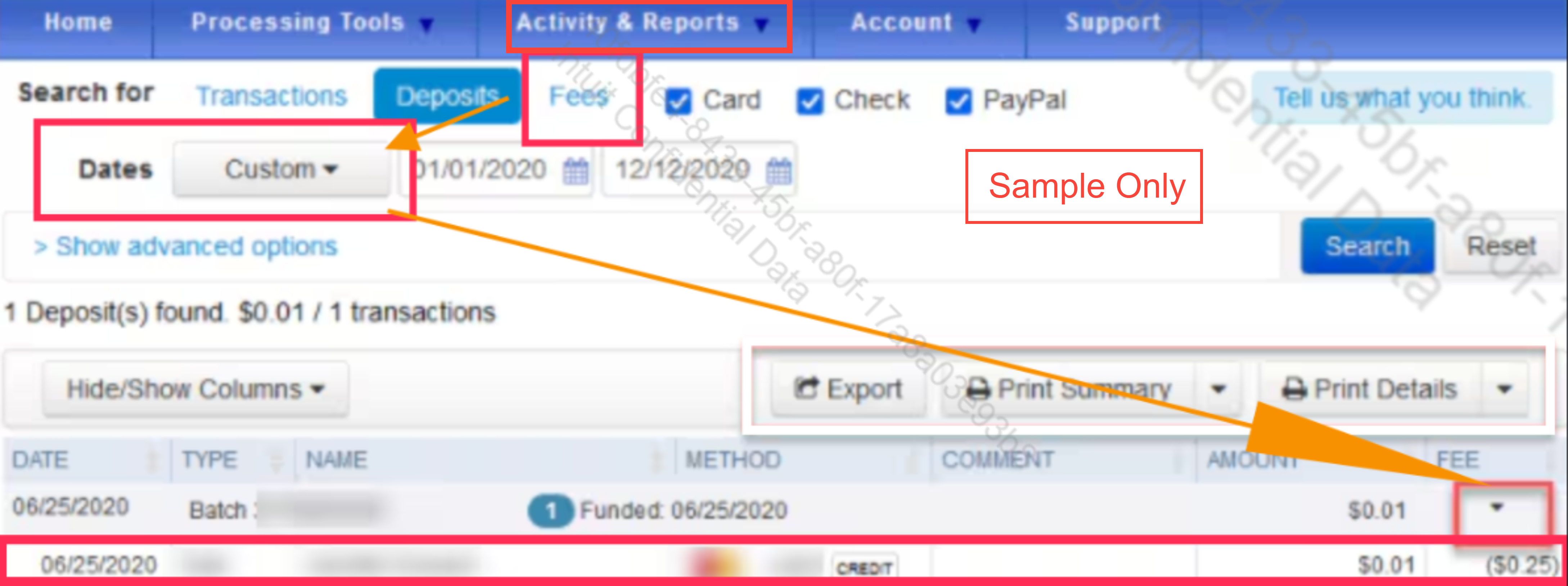
Hi there, Warren. We can sign in to your Merchant Service Center to see exactly what’s being charged. Under the Activity & Reports menu, select Fees and filter by the desired dates. You can filter any six months period within the last twelve months.
Once that's pulled up, click the dropdown arrow in the FEE column. That’ll expand the view so you can see exactly which transactions and fees make up each specific deposit.
I've attached a photo below so you can see what that looks like:
I’ll keep this conversation available for any follow-up updates or questions.
i have opened the fees but it does no show me the transaction amount associated with the fees
Thanks for getting in touch with the Community, warren32.
You can find which transfer fees are connected to specific payments by viewing your deposit details directly in the bank register or checking your Merchant Service Center.
Here's how to check in QuickBooks:
Additionally, here's how to check in your Merchant Service Center:
I've also included a detailed resource about using your Merchant Service Center which may come in handy moving forward: Find transactions, deposits, or fees
Please feel welcome to send a reply if there's any additional questions. Have a wonderful Wednesday!


You have clicked a link to a site outside of the QuickBooks or ProFile Communities. By clicking "Continue", you will leave the community and be taken to that site instead.
For more information visit our Security Center or to report suspicious websites you can contact us here


