Turn on suggestions
Auto-suggest helps you quickly narrow down your search results by suggesting possible matches as you type.
Showing results for
Get 50% OFF QuickBooks for 3 months*
Buy nowI've set up an automatic unpaid break for 30 minutes once a shift exceeds 5 hours. I've assigned the break to all employees but I have some employees for whom a break is not showing on their timesheet. Does anyone know why this might be? Could employees be overriding or deleting the automatic break somehow?
Thank you for adding your first post today, RMcIntoshTREC. I can share some insights into why some scheduled breaks are not appearing on timesheets.
I can see that the automatic unpaid break for 30 minutes is set once a shift exceeds 5 hours. Some employees may have clocked out before completing their 5-hour shift, so breaks don't apply to their timesheets.
At this time, you can view their timesheets to see how much time they've worked for a certain period.
I'm also adding this article for more information: View total hours worked in QuickBooks Time.
Additionally, you can get more tips on using the break feature to track your team members’ paid and unpaid breaks throughout the day from this article: Set up and manage breaks for QuickBooks Time.
Let me know in the comment section below if you have follow-up questions about automatic breaks in QuickBooks Time. I'm just a few clicks away to help. Have a good one!
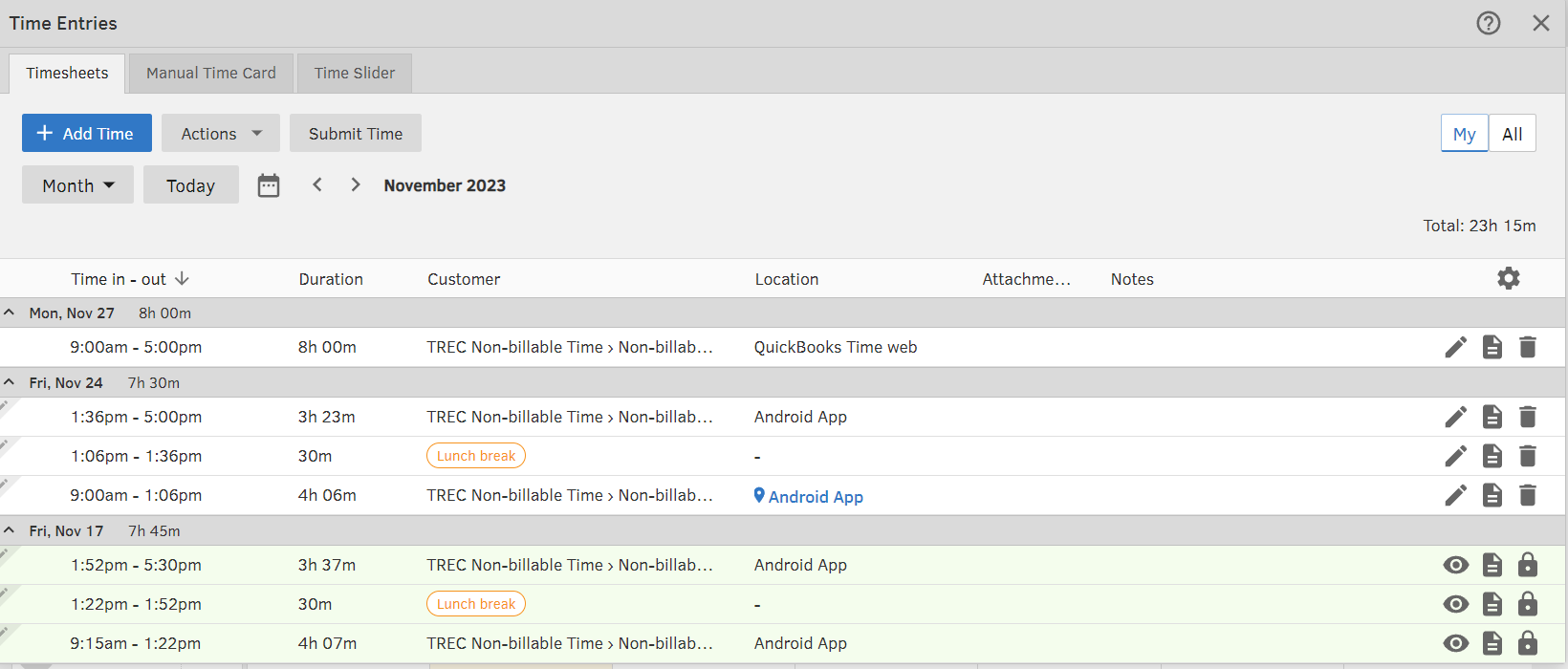
Hi Angelyn, unfortunately the solution is not that simple. On further investigation, I can see that automatic meal breaks do not appear if an employee enters the duration of their shift rather than a start and finish time or if they enter their timesheet on the web rather than through the app. I've attached an example from my own timesheet. I usually enter my time from the app and choose the start and finish time. I entered my time for 27/11/2023 on the web but still chose the start and finish time. As you can see, QuickBooks Time has not calculated an automatic meal break. Could this be a bug or a settings issue?
I appreciate you for making an effort to check the time entries and sharing a screenshot, RMcIntoshTREC.
I'm here to share troubleshooting steps to ensure the automatic meal breaks will apply to all your employees.
To start, I recommend turning off and on the feature. This will help us determine if the issue is caused by the setup. Here's how:
If this isn't the case, I suggest accessing your account using a private window. This way, we can determine whether this is a browser cache-related issue. The browser utilizes cached data to load web pages quickly. However, excessive cache can lead to problems that impact the appearance and functionality of your account.
An incognito mode helps us verify the issue since this doesn't save any files. Here are the keyboard shortcuts:
Once fixed, let's clear the browser's cache. Doing so deletes all the data from your browser and optimizes its performance. Using other supported browsers also helps us verify if this is a browser-specific issue.
If the issue persists, I recommend contacting our QuickBooks Time Support Team to ensure this gets investigated.
In the meantime, you'll want to consider using the app to track time entries.
Please keep in touch if you have additional questions about tracking hourly rates or time data. I’m always ready to help and get this taken care of for you. Have a good one.
Hi Charlene,
Thank you for the suggestions, unfortunately neither of them worked. I'll contact QuickBooks support as you have suggested.
Cheers,
Rachel.
I can see the urgency of this matter, and I want to ensure this is taken care of immediately, RMcIntoshTREC.
We appreciate you for performing the steps provided by my colleague. In this case, it would be best to contact our QuickBooks Time support. They have the tools to pull up your account in a secure environment and be able to investigate why some breaks are not showing on employees' timesheet.
You may want to learn more about managing time in QuickBooks Time. These resources will give detailed instructions:
Should you encounter any further challenges about managing your time data in QuickBooks, please don't hesitate to come back. We've got you covered.


You have clicked a link to a site outside of the QuickBooks or ProFile Communities. By clicking "Continue", you will leave the community and be taken to that site instead.
For more information visit our Security Center or to report suspicious websites you can contact us here