I'm happy to assist you in finding the refunded transaction, JD784.
To get started, make sure to enter the correct statement date when reconciling your account. You can also click the Clear filter/View all option in the reconciliation table to ensure that you'll see all the transactions you've added.
If the transactions are still not showing, we'll need to use the search feature within the account to locate them. It's possible they were posted to a different account, which is why they are not appearing when reconciling your account. Once the transactions have been located, please open them and edit the payment account as needed.
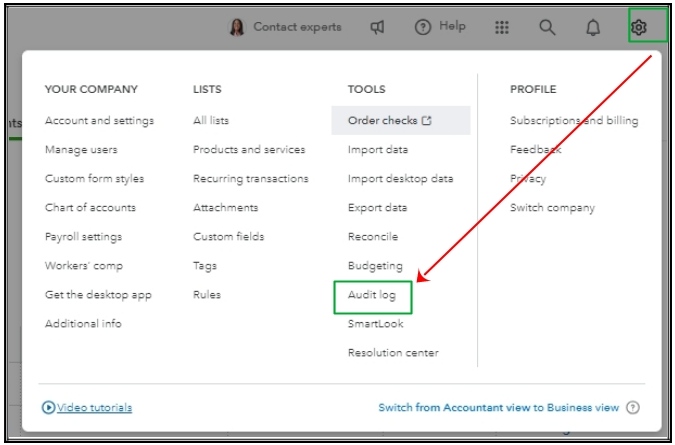
If there are no search results showing, let's check the Audit Log report in case the transaction was deleted. Here's how:
- Go to the Gear icon.
- Under Tools, select Audit Log.
When you find a record of deletion, I suggest on recreating it, check out this article on how: Use the audit log to re-enter deleted transactions in QuickBooks Online.
Moreover, I'm sharing this article to assist you if you want to run a reconciliation report: How do I view, print, or export a reconciliation report?
Leave a comment below if you still have questions about your reconciliation. Have a great day.




