Turn on suggestions
Auto-suggest helps you quickly narrow down your search results by suggesting possible matches as you type.
Showing results for
Get 50% OFF QuickBooks for 3 months*
Buy nowHow do I set up a report to run a Calendar quarter (not P&L) when the company year end is August. I need to show the Details for July/August/September but am only getting "closing entry" for July/August and the details for September when I put in the dates of July 1 - September 30.

Let me guide you on how you can set up a report for your Fiscal Quarter, DeanneBDA.
If you have already changed the start of your fiscal year in QuickBooks Desktop, you can run a custom report and set it up according to how you want to show the information. I've outlined the steps on how to do it.

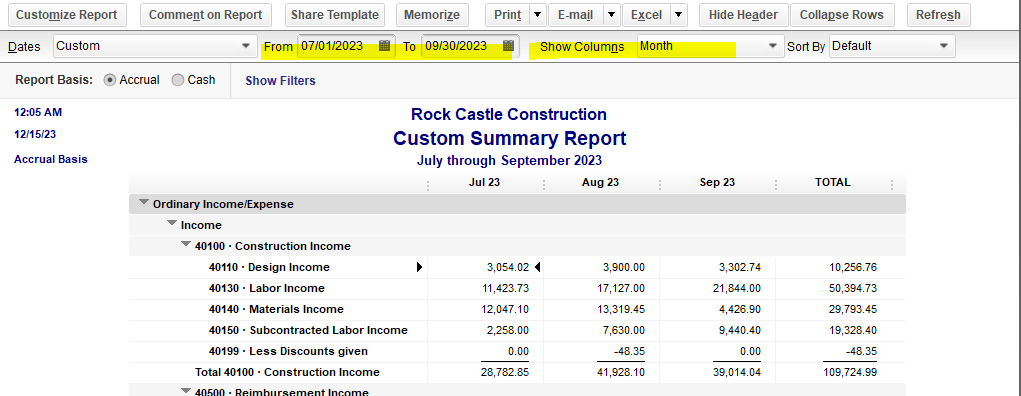
QuickBooks provides the flexibility to create reports on how you want to show the information. For more details on how you can customize the report that you want to generate, check out this article for your guide: Customize Reports In QuickBooks Desktop.
Once you're now sure that information is accurate, start balancing your checkbook and make sure your real-life bank and credit card statement matches. Go through this article for your guide: Reconcile An Account In QuickBooks Desktop.
Keep in touch if you have questions that you'd like to ask. Remember, the Community is always here for you to assist.
This is not helpful and in no way addresses the question I asked. Please re-read what I asked. I know how to run a FISCAL quarter report - thats quite obvious. I clearly stated I need to run a CALENDAR quarter report. My client has a fiscal year ending August, and I need to run a CALENDAR quarter report for July - September but I do not get the details of July and August and only get "closing entry" and an amount.
Whether or not you see the opening balance row or full details depends I think on the report you start with, and perhaps the account type as well.
If you want to see full details for various accounts, start with a custom transaction detail report. It's a generic report that will show all accounting details for any/all periods.
Start at Reports | Custom Reports | Transaction Detail.
Then enter the desired date range and then Customize the report and filter it for the desired account.
That should result in a report that shows all the details in the account for the period selected.


You have clicked a link to a site outside of the QuickBooks or ProFile Communities. By clicking "Continue", you will leave the community and be taken to that site instead.
For more information visit our Security Center or to report suspicious websites you can contact us here


