Turn on suggestions
Auto-suggest helps you quickly narrow down your search results by suggesting possible matches as you type.
Showing results for
Get 50% OFF QuickBooks for 3 months*
Buy nowWe have reports that automatically go out on Thursday. Many of them went out today (Wednesday) instead. When I look at the Email Schedule (see attached), it says a report repeats weekly on THURSDAY, and the next date is 08/30/2023 - which is a WEDNESDAY.
I have tried removing the schedule and creating a new one, but the calendar is still off by a day.
Anyone else having calendar issues? Any fixes?

Let's figure out what's going on, @erbrel. We'll try to perform troubleshooting steps to minimize the error you encountered within QuickBooks Online.
We can use an incognito window and sign in to your account there. If this option works, we can clear the cache from your regular browser.
Here are the shortcuts to incognito browsers:
Furthermore, the cache can hamper and affect the functionality of QuickBooks and result in missing tabs and features, thus clearing the cache to reduce issues when using QuickBooks.
Moreover, if you encounter similar difficulties, we can manage and pull up a report manually in QuickBooks Online.
You can still add your response in this thread if you need further assistance handling your reports. Have a great day ahead.
This is definitely not a browser issue. It is on everyone's login/computer the same way. The calendar is simply off by a day -it is a QBO snafu that needs fixing!
I appreciate your dedication to resolving the issue, PBI-INADS. Let's ensure you can successfully email the scheduled report with the correct date in QuickBooks Online (QBO).
After assessing our records, I've identified an ongoing investigation related to your matter in a different region. In light of this, I suggest reaching out to our support team. It'll enable them to securely access your account and delve into the issue's root cause.
Here's how:
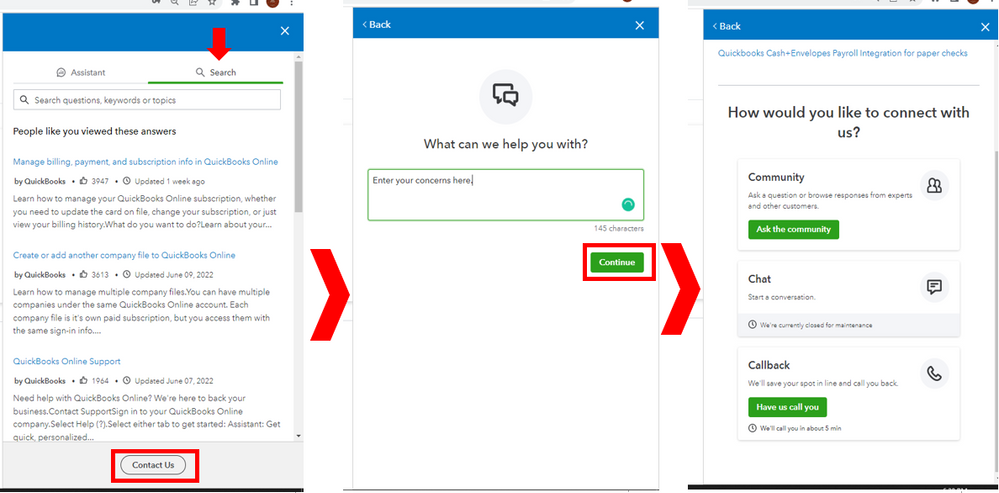
Let me know in the comments if you have other concerns with your reports in QBO. I'll gladly help. Take care!


You have clicked a link to a site outside of the QuickBooks or ProFile Communities. By clicking "Continue", you will leave the community and be taken to that site instead.
For more information visit our Security Center or to report suspicious websites you can contact us here


