You can change the category or account for that specific transaction, @jsglasberg.
You'll just have to undo it and then It'll go back to the For Review tab. From here, you can set the right category (revenue). Let me show you how:
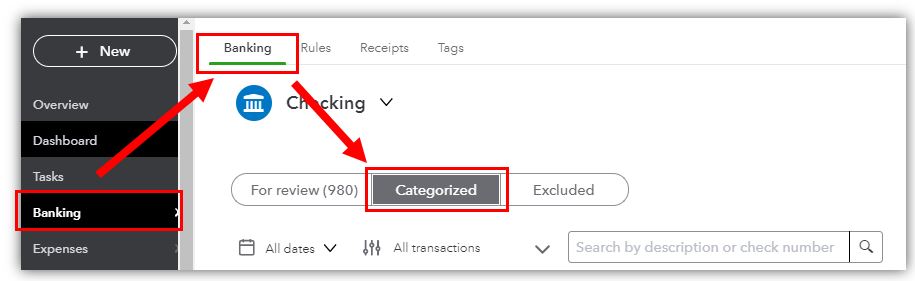
- Go to the Banking menu or Transactions menu and then proceed to the Banking tab.
- Choose tile for the bank or credit card account where this transaction is coming from and click on Categorized tab.
- Find the transaction you want to unmatch and click Undo from the Action column.
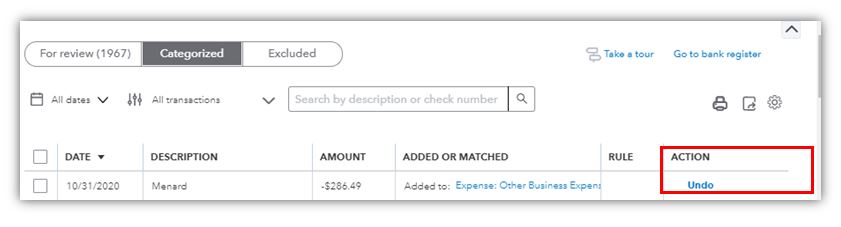
The transaction is now back in the For review tab. Click to open the transaction from that tab and set the right category.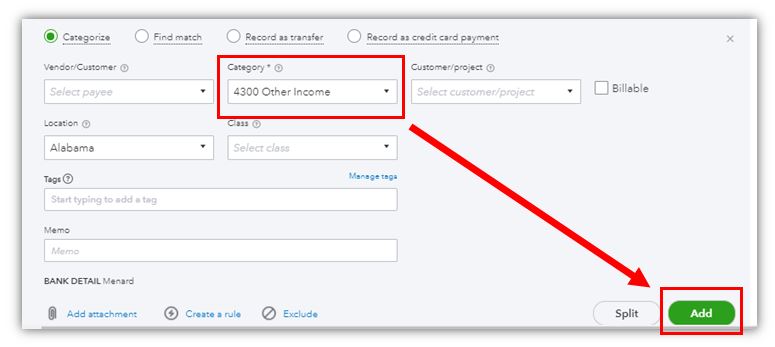
Check these articles for more information:
You can also refer to the following article for more information on how to reconcile your accounts so they always match your bank and statements: Reconcile an account in QuickBooks Online.
I'm always here if you need further guidance in updating the category for this bank transaction. I'm always here to assist. Have a great rest of the day!




