Turn on suggestions
Auto-suggest helps you quickly narrow down your search results by suggesting possible matches as you type.
Showing results for
Get 50% OFF QuickBooks for 3 months*
Buy now
Thanks for reaching out to us here today, @rfyoung414.
I'll share some information about auto-pay. Yes, you can set up auto-pay for your contractor. First, look for service providers that integrate with QuickBooks Online when scheduling automatic payments. Once you're ready, you can set up recurring payments in QuickBooks. Let me guide you how.
To create a recurring transaction:
Here's how it looks like.
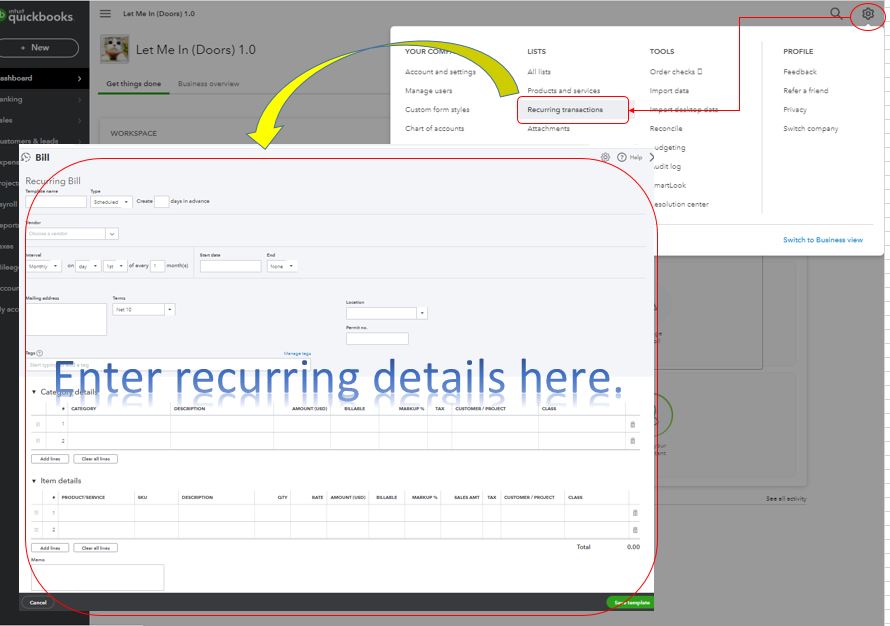
I've added these links below for additional reference. It has information with steps to guide through the process.
With the above recommendation, you're able to set up auto-pay for your contractors. There's no need for you to pay them manually.
Additionally, here's a link that'll help you manage vendor-related tasks. It has topics with articles you can choose from: Expenses and vendors.
Please don't hesitate to reply to this thread if you have follow-up questions or concerns with auto-pay. I'll be around for you. Take care and have a good one.
As another option, open a separate Melio account for free to integrate with QBO to manage your bills. It offers more features including the approval process.
https://melio.grsm.io/quickbooks
I tried this and entered expense as type. My contractor did not receive her money. On phone now with one of the Quickbook representatives and she is telling me that this is not an option to pay using direct deposit
Thanks for joining the Community and getting involved with this thread, Christy H.
You can pay contractors manually with direct deposit. After adding your contractor and setting up direct deposit, you can create payments.
Here's how:
Automatic payments are not possible with this process. If you're interested in paying contractors automatically on a set schedule, I'd recommend checking our QuickBooks App Store for apps which may be able to help you achieve what you're looking to accomplish.
You'll also be able to find many detailed resources about using QuickBooks in our help article archives.
Please don't hesitate to send a reply if there's any additional questions. Have an awesome Friday!


You have clicked a link to a site outside of the QuickBooks or ProFile Communities. By clicking "Continue", you will leave the community and be taken to that site instead.
For more information visit our Security Center or to report suspicious websites you can contact us here





