Turn on suggestions
Auto-suggest helps you quickly narrow down your search results by suggesting possible matches as you type.
Showing results for
Get 50% OFF QuickBooks for 3 months*
Buy now
Hi, menworkingco. I can help you add a Project Address box to your invoices in QuickBooks Online (QBO).
Changing the Shipping Address to a different name isn't possible in customizing an invoice template. We can, however, utilize the Custom field feature to add a Project Address box. Please note that this feature is only available for QBO Essentials, Plus, and Advanced. Otherwise, you can consider upgrading your subscription to utilize this and apply it to your sales forms. Here's how:
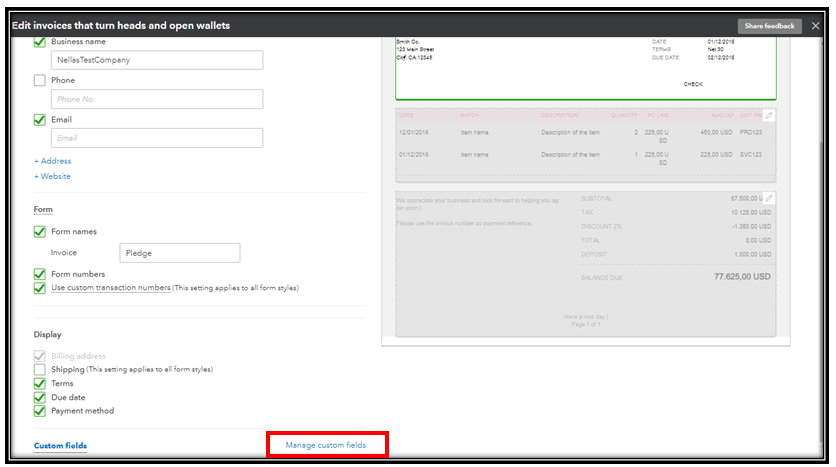
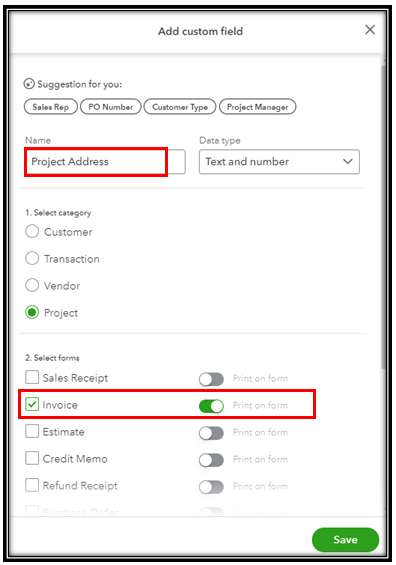
Refer to this article for more information: Create and edit custom fields in QuickBooks Online Advanced.
I'm adding these articles to learn more about invoices and how to manage invoice payments:
You can always get back to us if you have follow-up questions about managing invoices in QBO. I'd be more than willing to lend you a hand.
Nicole,
You have been, by far, the most helpful of all the people I have communicated with about this issue so I thank you. I have QBO Essentials which you listed as a subscription level that allows the customizing you're referring to. When I go to Manage Custom Fields, there is not a Data Type drop down box. I think you're suggestion would be a great solution but I don't have that option. I am wondering if there is a glitch somewhere because I have made several changes to the invoice, saved them and then not have them apply.
Also, I had a really hard time getting back to my question. Is there a place in QBO that shows this conversation so I can easily reply to it? If so, where do I go?
Thank you again Nicole. You're help is greatly appreciated.
Hello there, @menworking.
I can share details about why you're unable to access the Data type dropdown using QuickBooks Online Essential to customize your invoice template. Although you can use the Custom Fields in your account, the Data type dropdown is only accessible using the QBO Advance version. If you want to use this, I recommend upgrading your account subscription to utilize this functionality seamlessly.
For reference to the information above, you can check out this article: Create and edit custom fields in QuickBooks Online Advanced.
To know more about what you can create using custom fields in QBO Plus and Essential, visit this article: Add custom fields to sales forms and purchase orders in QuickBooks Online.
Regarding your second question, the only place you can converse with us is through the Community forum since QBO is used mainly for business accounting. Also, you'll get notified via email once someone replies to your post.
You can also check this article if you want to record customer-based payments: Record invoice payments in QuickBooks Online.
Please don't hesitate to get back to us if you have other concerns regarding custom fields in QBO. The Community forum is always here to assist you.
So help me understand this solution. Our very small business is being forced to migrate from QBDT 2021 to QBO. The Intuit sales rep suggested QB Essential which is working fine except for the invoice template. We are a service company, not a sales company so we need to show a project address, not a shipping address. In order to make that one small fix, we have to spend an addition $70/month?! No one on the tech side is willing to either help add this box? Really poorly handled Intuit. I might just take my chances with my current desktop version.


You have clicked a link to a site outside of the QuickBooks or ProFile Communities. By clicking "Continue", you will leave the community and be taken to that site instead.
For more information visit our Security Center or to report suspicious websites you can contact us here


