Turn on suggestions
Auto-suggest helps you quickly narrow down your search results by suggesting possible matches as you type.
Showing results for
Get 50% OFF QuickBooks for 3 months*
Buy now
Welcome to Community, @careygotro.
I'll share some information about attaching receipts. You can view your uploaded receipts in the Receipts tab. After you've uploaded the receipt, you'll need to review, edit, add, or match the receipt to the existing transactions.
Let me walk you through how.
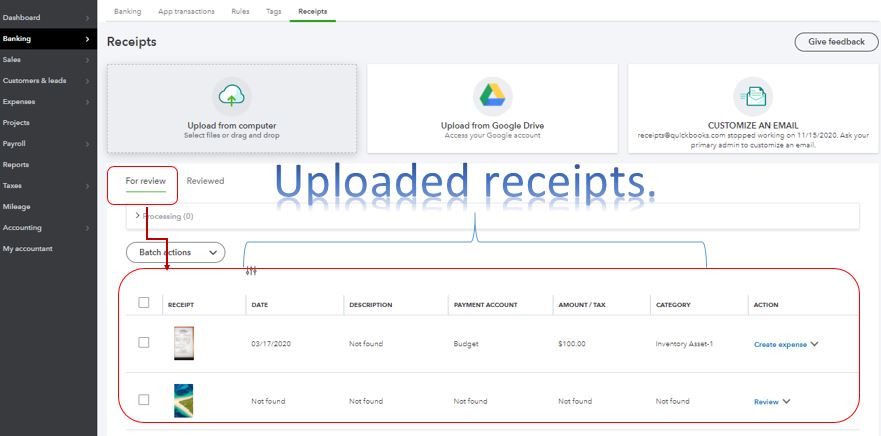
With the above steps, you're able to attached the receipt to your QuickBooks transactions. Learn more about the process in this article: Upload your receipts and bills to QuickBooks Online.
From there, you're now ready to reconcile your account. This will give you insight into your business and QuickBooks process as easy as possible.
Let me know if you have other questions or concerns about receipts. I'm more than happy to answer them for you. Take care and stay safe.
Hi, Thank for your reply. If I have an existing invoice can I no longer add a receipt that is already in QB to that invoice?
I used to click on the attachments box and it would open a column on the right and I could search for receipts that are uploaded to QB. Is that no longer an option?
Thanks
I think they might have meant attachments - we no longer have the "browse' option to add an attachment that is already in QB. Please help!
I appreciate you for posting your concern here in the Community, seannagyrecycling.
I'm here to help provide some troubleshooting steps to isolate the attachment issue in QuickBooks. Attachments added to transactions in QuickBooks are possible to attach as long as you follow its maximum size limit.
To fix this, I'd like to make sure this isn't a problem with the browser. I recommend clearing the cache, since it can sometimes become full of older data, potentially causing viewing errors in QuickBooks Online. Clearing the cache will allow you to work with a clean slate and resolve errors like this. This article will walk you through the steps depending on which browser you're using: Clear cache and cookies to fix issues when using QuickBooks Online.
If the same problem occurs, try using a different browser. This can be an issue with the browser that you use and QuickBooks.
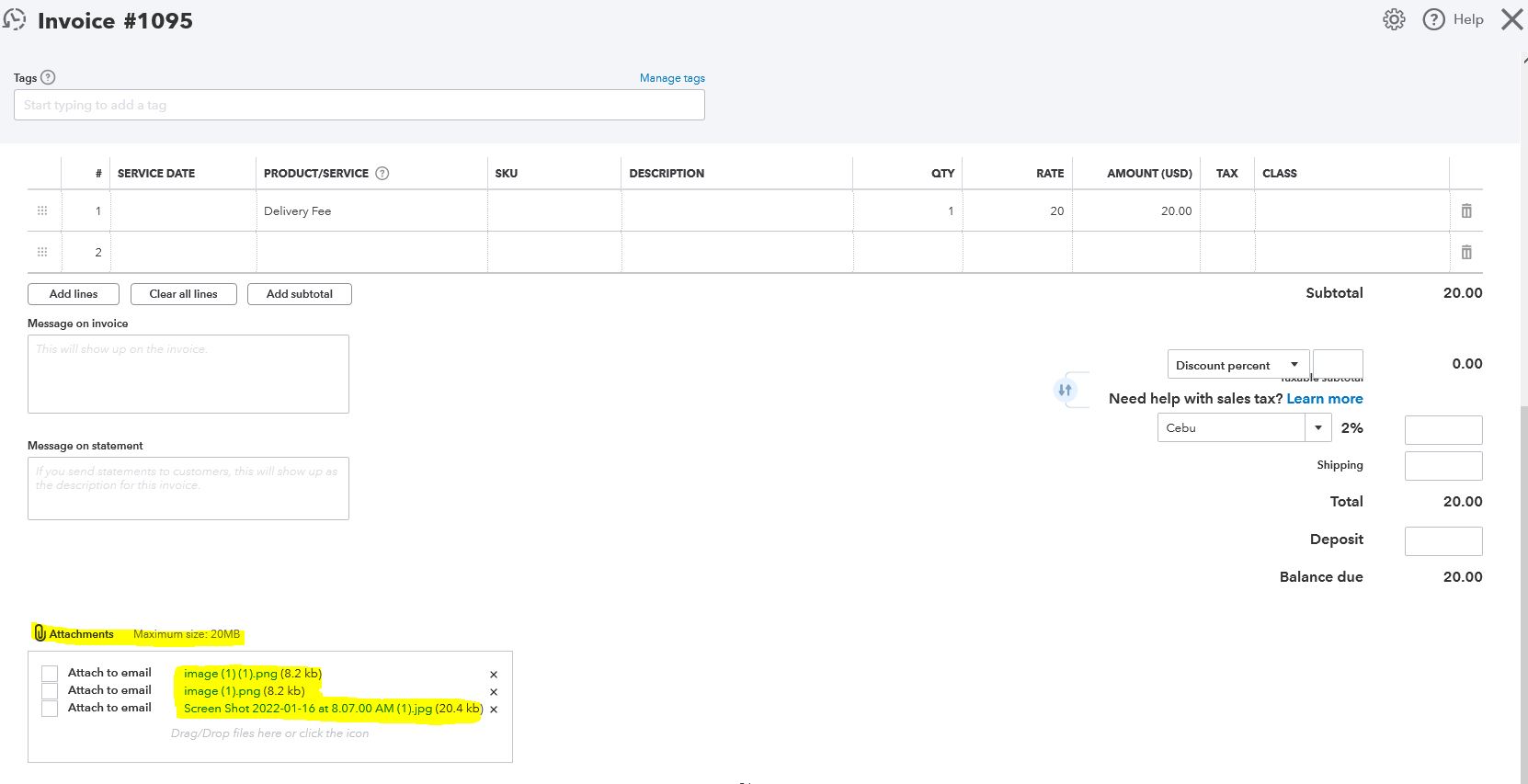
You'll want to check this article to get more ideas and tips for adding an attachment to any transactions: Attachments in QuickBooks Online
Keep me updated on how things go on your end. I want to ensure this gets resolved for you. Have a great day, seannagyrecycling.
Nope, neither worked. I can add attachments from my pc by clicking on Attachments or using the Drag & Drop feature. But I've already uploaded the attachments into QB and it shows in my list of Attachments. But there is no Browse button in the screen below (attached screenshot & your screenshot is missing it also!). It used to be there, so I could add an attachment that is already uploaded in QB. No I have to resave it to my pc and upload it again in each of the transaction screens. Not very efficient.


You have clicked a link to a site outside of the QuickBooks or ProFile Communities. By clicking "Continue", you will leave the community and be taken to that site instead.
For more information visit our Security Center or to report suspicious websites you can contact us here


