Turn on suggestions
Auto-suggest helps you quickly narrow down your search results by suggesting possible matches as you type.
Showing results for
Get 50% OFF QuickBooks for 3 months*
Buy nowHi!
I'm trying to categorize expenses by donor, but that dropdown list does not appear when I go in to categorize expenses. Only "Vendor", "Category", and "Class" appear. Can someone help me figure out how to add the "Donor" dropdown so that I can categorize according to donors?

I know a way that can let us categorize expenses by Donor, @Meghan B.
The Track expenses and items by customer may be turned off in your account and settings. This could be the reason why you're not seeing the drop-down when categorizing donors. Follow the steps below to turn on this feature:
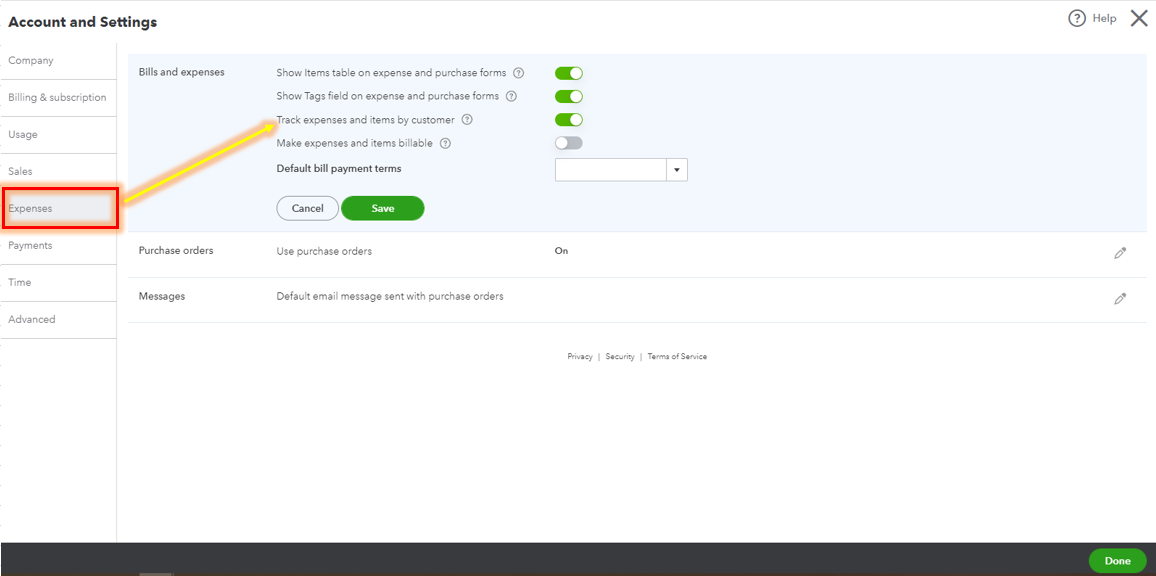
This will be able to add a drop-down list for donors. Refresh the banking page and we're all set.
Just in case you want to automatically categorize your bank transactions, you can utilize the bank rules feature in QuickBooks Online. With this, you don't need to categorize them manually.
Please know that I'm just a reply away if you need any further assistance managing your bank transactions. Have a good one.
Thank you for the information, I was successfully able to find and add the feature!
Hello there, Meghan.
We're delighted to hear that the steps shared by my colleague were able to help you categorize your expenses in QuickBooks Online (QBO). If you have any further QuickBooks-related concerns, please don't hesitate to swing by the Community. We're always around to help. Stay safe, and have a great rest of the day!


You have clicked a link to a site outside of the QuickBooks or ProFile Communities. By clicking "Continue", you will leave the community and be taken to that site instead.
For more information visit our Security Center or to report suspicious websites you can contact us here


