Welcome to the Community, @gmedia. I’m here to help make sure you can link the deposit under your customer profile. Follow below to finish it right away.
I appreciate you providing details as well as screenshots of your concern. This truly helps me to understand and give solutions to fix the issue. Let me go over and discuss information about this.
In QuickBooks Online (QBO), you'll have to ensure that the Account Receivable account is selected when creating a deposit for that customer. This way, the transaction will also appear on their Transaction list. To do so, you'll want to edit the deposit. Here's how:
- In your QBO account, go to Accounting. Then, select Chart of accounts.
- From there, find the account you deposited the payment to and click View register.
- Look for the correct deposit. Then, select Edit.
- In the Add funds to this deposit section, find the deposit.
- Select the Account dropdown and choose Accounts Receivable.
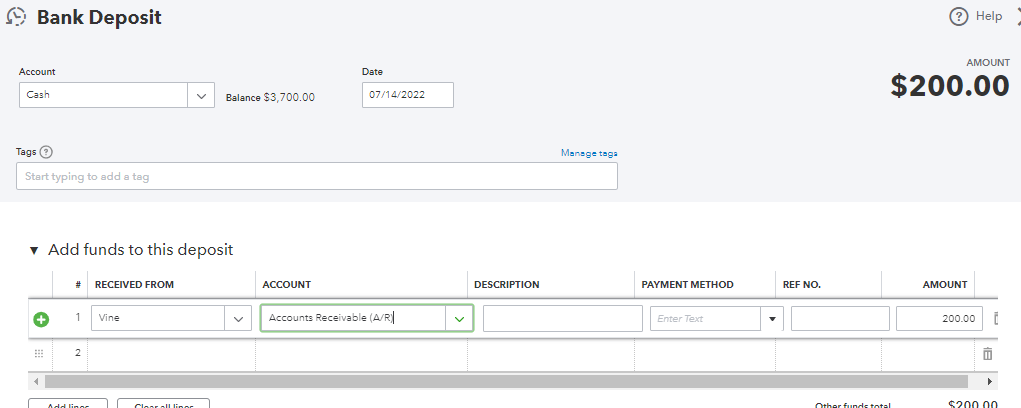
- Once done, click Save and Close.
After that, go to that customer profile and check if you can now see the deposit. 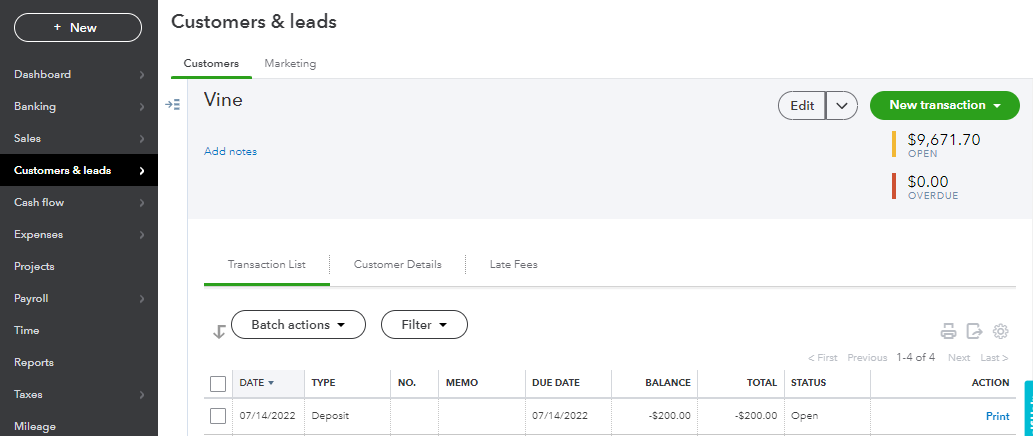
That should do it. Once the invoice is imported, you're now ready to link the deposit to it. See this article for the detailed steps: How to link a bank deposit to an invoice.
Additionally, here's an awesome resource that you can access for guidance in managing your customer payments: Take and process payments in QuickBooks Online.
Please let me know updates on how this goes. I want to make sure you achieve your goal. Feel free to add comments below for any additional questions about managing customer deposits. I'm just a post away to help. Take care and have a delightful day.





